
Toyota Corolla (E210): Exterior
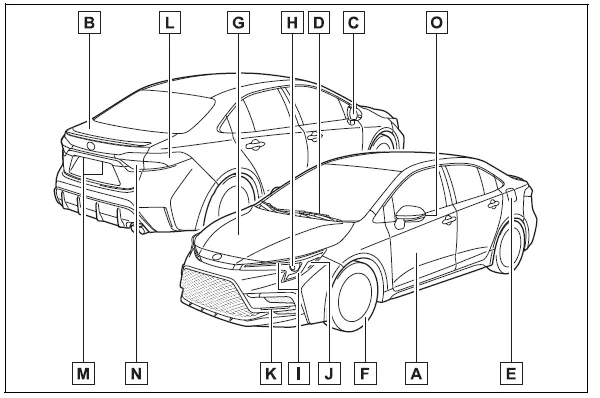
- Doors Locking/unlocking Opening/closing the side windows Locking/unlocking by using the mechanical key*1 Warning messages
- Trunk
Opening from inside
Opening from outside
Warning messages - Outside rear view mirrors
Adjusting the mirror angle
Folding the mirrors
Defogging the mirrors*2 - Windshield wipers Precautions for winter season To prevent freezing (windshield wiper de-icer)*2
- Fuel filler door Refueling method Fuel type/fuel tank capacity
- Tires Tire size/inflation pressure Winter tires/tire chains Checking/rotation/tire pressure warning system*2 Coping with flat tires
-
Hood
Opening
Engine oil
Coping with overheating - Headlights/daytime running lights
- Turn signal lights/parking lights
- Front side marker lights
- LED accent lights*2
- Stop lights/tail lights/rear side marker lights/turn signal lights
- License plate lights
- Tail lights*2
Back-up lights
Shifting the shift position to R - Side turn signal lights*2
*1:Vehicles with a smart key system *2:If equipped


Other materials:
Removal and installation of engine intake parts
If any metal tip is mixed in the inlet pass, this may give a
bad effect to the engine and turbocharger.
when removing and installing the inlet system parts,
close the opening of the removed inlet system parts and
the engine with a clean shop rag or gummed tape.
when inst ...
Tire information
Typical tire symbols
► Full-size tire
► Compact spare tire
1 Tire size
2 DOT and Tire Identification Number (TIN)
3 Uniform tire quality grading
For details, see “Uniform Tire Quality Grading” that follows.
4 Location of treadwear indicators
5 Tire ply composition and ma ...
Chassis
On–vehicle inspection
1. Inspect steering linkage
check the steering wheel freeplay .
check the steering linkage for looseness or damage.
Check that the tie rod ends do not have excessive play.
Check that the dust seals and boots are not damaged.
Chec ...