
Toyota Corolla (E120): Replacement
Hint
: components:
1. Precaution
2. Disconnect battery negative terminal
3. Remove front door scuff plate rh
4. Remove rear door scuff plate rh
5. Remove front door opening trim rh
6. Remove rear door opening trim rh
7. Remove lap belt outer anchor cover
8. Remove center pillar garnish lower rh
9. Remove front seat outer belt assy rh
10. Remove side air bag sensor assy rh
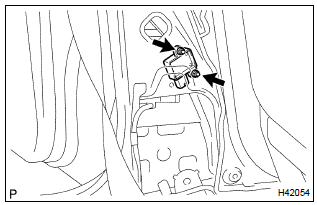
- Disconnect the connector from the side airbag sensor assy rh.
- remove the 2 nuts and side airbag sensor assy rh.
11. Inspect side air bag sensor assy rh
12. Install side air bag sensor assy rh
- install the 2 nuts and side airbag sensor assy rh.
Torque: 8.0 Nvm (82 kgfvcm, 71 invlbf)
- connect the side airbag sensor connector.
Notice
:
- installation of the connector is done with the sensor assembly installed. Make sure that the sensor assembly is installed to the specified torque.
- If the sensor assembly has been dropped, or there are cracks, dents or other defects in the case, bracket or connector, replace the sensor assembly with a new one.
- When installing the sensor assembly, take care that the srs wiring does not interfere with other parts and is not pinched between other parts.
- After installation, shake the sensor assembly to check that there is no looseness.
13. Install front seat outer belt assy rh
Torque:
upper bolt: 4.9 Nvm (50 kgfvcm, 43 in.Vlbf)
lower bolt: 41.2 Nvm (420 kgfvcm, 30 ftvlbf)
14. Inspect srs warning light


Other materials:
Diagnostic trouble code chart
Notice:
when removing the part, turn the ignition switch to off.
Hint:
using sst 09843–18040, it connect the terminal tc and cg of dlc3.
If any abnormality is not found when inspecting parts, inspect the ecu and
ground points for poor contact.
If a malfunction code is displayed during ...
Luggage compartment door
Adjustment
1. Inspect luggage compartment door panel sub–assy
check that the clearance is within the standard value.
2. Adjust luggage compartment door panel sub–assy
For forward/rearward and right/left adjustments, loosen
the bolts.
Torque: 7.0 N·m (71 kgf·cm, 62 i ...
Terminals of ecu
1. Inspect integration relay
Disconnect the connector from the integration relay.
check the continuity between each terminal of the disconnected connector
and the body ground, as
shown in the illustration and table.
Standard:
If the result is not as specified, the vehicle’s ...