
Toyota Corolla (E210): Selecting tire chains
Use the correct tire chain size when mounting the tire chains.
Chain size is regulated for each tire size.
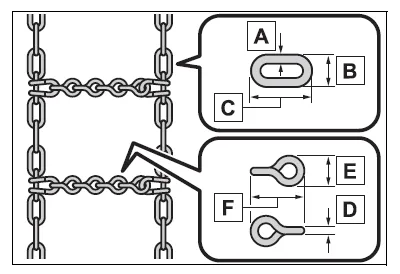
- Side chain (0.12 in. [3 mm] in diameter)
- Side chain (0.39 in. [10 mm] in width)
- Side chain (1.18 in. [30 mm] in length)
- Cross chain (0.16 in. [4 mm] in diameter)
- Cross chain (0.55 in. [14 mm] in width)
- Cross chain (0.98 in. [25 mm] in length)
Regulations on the use of tire chains
Regulations regarding the use of tire chains vary depending on location and type of road.
Always check local regulations before installing chains.
■Tire chain installation
Observe the following precautions when installing and removing chains:
- Install and remove tire chains in a safe location.
- Install tire chains on the front tires only. Do not install tire chains on the rear tires.
- Install tire chains on the front tires as tightly as possible. Retighten chains after driving 1/4-1/2 mile (0.5-1.0 km).
- Install tire chains following the instructions provided with the tire chains.
NOTICE
■Fitting tire chains (vehicles with a tire pressure warning system)
The tire pressure warning valves and transmitters may not function correctly when tire chains are fitted.

Other materials:
Registering and connecting from the “Bluetooth* Setup” screen
To display the screen shown below, press the “SETUP” button and select “Bluetooth*”
on the “Setup” screen.
1 Select to connect the device to be used with multimedia system.
2 Select to register a Bluetooth® device to be used with multimedia system.
3 Select to set detailed Bluet ...
Evap monitor (vacuum pressure monitor)
Notice:
a cold soak must be performed prior to conducting the drive pattern to complete
the internal pressure
readiness monitor.
Cold soak preconditions
The monitor will not run unless:
mil is off.
Fuel level is approximately 1/2 to 3/4.
Altitude is 7800 feet (2400 m) or less.
...
Rear combination lamp assy lh
Replacement
Using a clipremover, remove the 2 clips and disconnect
the luggage compartment trim cover lh.
Disconnect the connector and remove the 3 nuts.
Pull out the rear combination light assy lh to the back of
the vehicle, and remove.
...