
Toyota Corolla (E120) 2002–2008 Repair Manual / Front suspension / Front suspension system / Problem symptoms table
Toyota Corolla (E120): Problem symptoms table
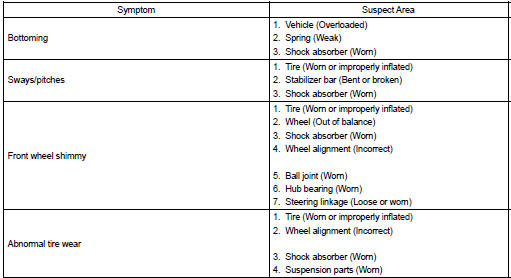
Use the table below to help you find the cause of the problem. The numbers indicate the priority of the likely cause of the problem. Check each part in order. If necessary, replace these parts.


Other materials:
Terminals of ecu
1. Inspect integration relay
Disconnect the connector and check the continuity of each terminal of
the disconnected connector.
Standard :
If the result is not as specified, the vehicle’s side may malfunction.
Reconnect the connector and check each terminal.
Standard:
If ...
Description
When troubleshooting obd ii vehicles, the only difference
from the usual troubleshooting procedure is that you
need to connect the vehicle to the obd ii scan tool complying
with sae j1978 or the hand–held tester, and read
various data output from the vehicle’s ecm.
Obd ii regulation ...
Using the dynamic radar
cruise control
Setting the vehicle speed
1. Press the driving assist mode
select switch to select
dynamic radar cruise control.
The dynamic radar cruise control
indicator will illuminate.
2. Using the accelerator pedal,
accelerate or decelerate to
the desired vehicle speed
(approximately 20 mph [30
km/h] or more ...