
Toyota Corolla (E120) 2002–2008 Repair Manual / Diagnostics / Cruise control system / How to proceed with troubleshooting
Toyota Corolla (E120): How to proceed with troubleshooting
1 Vehicle brought to workshop

2 Customer problem analysis

3 Check and clear dtc

4 Problem symptom confirmation

5 Symptom simulation

6 Dtc check

7 Dtc chart

8 Problem symptoms table

9 Circuit inspection
10 Identification of problem
11 Parts inspection
12 Repair
13 Confirmation test
End
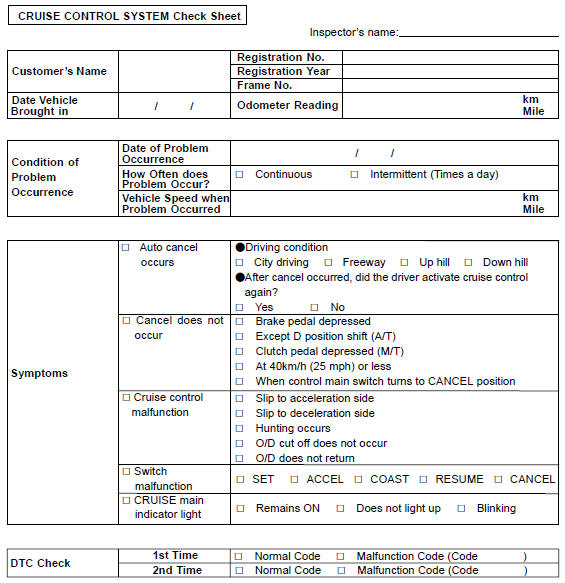
Customer problem analysis check


Other materials:
Inspection
1. Power window system circuit
2. Inspect power window regulator master switch assy
Inspect the master switch continuity.
[Driver’s switch (window unlock and lock)]
Standard:
[Front passenger’s switch (window unlock)]
standard:
[Front passenger’s switch (window lock)]
...
Manual transmission / transaxle
Service data
Torque specification
...
Speed control main switch assy
Replacement
1. Disconnect battery negative terminal
2. Inspect place front wheels facing straight ahead
3. Remove horn button assy
4. Remove steering wheel assy
sst 09950–50013 (09951–05010, 09952–05010, 09953–05020, 09954–05021)
5. Remove speed control main switch assy
Remov ...