
Toyota Corolla (E210) 2019-2026 Owners Manual / Interior features / Using the interior lights
Toyota Corolla (E210): Using the interior lights
Interior lights list
Location of the interior lights
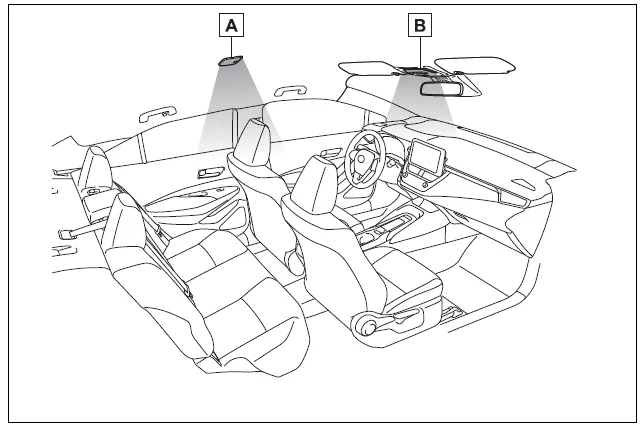
- Rear interior light
- Front interior/personal lights
Operating the interior lights
■ Front
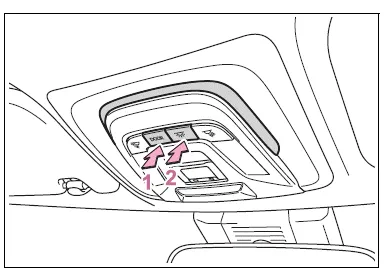
- Turns the door position on/off
When a door is opened while the door position is on, the lights turn on.
- Turns the lights on/off
■ Rear
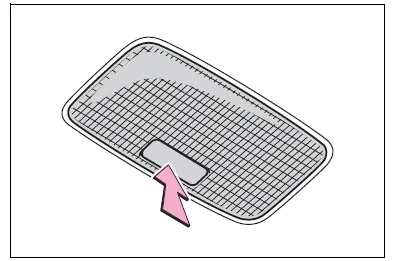
Turns the lights on/off
When the door position is on for the front interior lights, the rear interior light will turn on when a door is open and turn off when all of them are closed.
When the rear interior light is on linked to the door position for the front interior lights, it will not turn off even though the switch is pressed.
Operating the personal lights
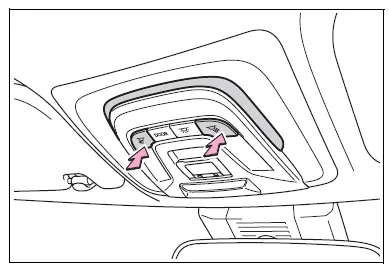
Turns the lights on/off
■Illuminated entry system
The lights automatically turn on/off according to the engine switch mode (position), the presence of the electronic key (vehicles with a smart key system), whether the doors are locked/unlocked, and whether the doors are opened/closed.
■To prevent the battery from being discharged
If the interior lights remain on when the engine switch is turned off, the lights will go off automatically after 20 minutes.
■The interior lights may turn on automatically when
If any of the SRS airbags deploy (inflate) or in the event of a strong rear impact, the interior lights will turn on automatically.
The interior lights will turn off automatically after approximately 20 minutes.
The interior lights can be turned off manually. However, in order to help prevent further collisions, it is recommended that they be left on until safety can be ensured.
(The interior lights may not turn on automatically depending on the force of the impact and conditions of the collision.)
■Customization
Some functions can be customized.
NOTICE
■To prevent battery discharge
Do not leave the lights on longer than necessary when the engine is not running.


Other materials:
Foamed material application areas
If an increase in temperature or other condition damages the foamed material
when repairing or replacing the panel,
fill in the insufficient areas with urethane foam. The following illustration
shows the areas for one side, but the
foamed material must be applied equally to both the left and r ...
Circuit description
The seat position sensor circuit consists of the airbag sensor assy center
and seat position sensor.
Dtc b1153/25 is recorded when a malfunction is detected in the seat position
sensor circuit.
Wiring diagram
...
Unlocking and locking the doors from the inside
◆ Door lock switches
1 Locks all the doors
2 Unlocks all the doors
◆ Inside lock buttons
1 Locks the door
2 Unlocks the door
The front doors can be opened by pulling the inside handle even if the lock buttons
are in the lock position.
...