
Toyota Corolla (E120) 2002–2008 Repair Manual / Diagnostics / Audio system / Diagnostic trouble code chart
Toyota Corolla (E120): Diagnostic trouble code chart
|
Terms |
Terms |
| Physical address | Three–digit code (shown in hexadecimal) which is given to each
component comprising
the avc–lan.
Corresponding to the function, individual symbols are specified. |
| Logical address | Two–digit code (shown in hexadecimal) which is given to each function comprising the inner system of the avc–lan. |
1. Radio receiver assy (physical address: 190)
Hint
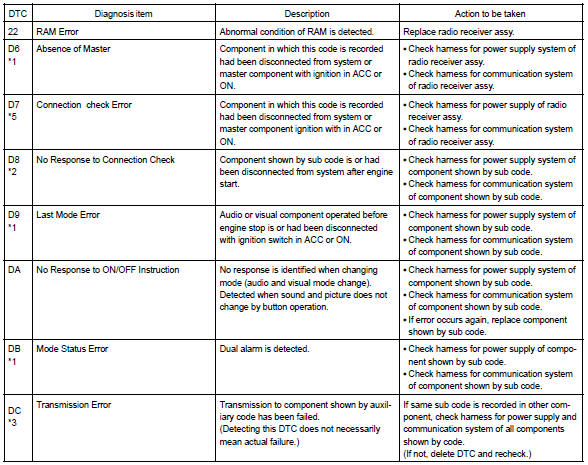
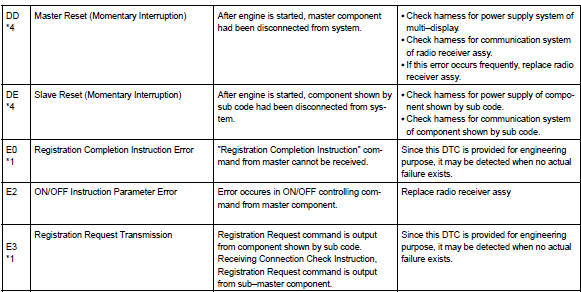
: *1: even if no failure is detected, it may be stored depending on the battery condition or voltage for starting an engine.
*2: It is stored when 180 sec. Has passed after the power supply connector is pulled out after engine start.
*3: It may be stored when the engine key is turned 1 min. After engine start.
*4: It may be stored when the engine key is turned again after engine start.
*5: When 210 sec. Has passed after pulling out the power supply connector of the master component with the ignition switch in acc or on, this code is stored.
- Logical address: 01 (communication control)
- Logical address: 61 (cassette switch)

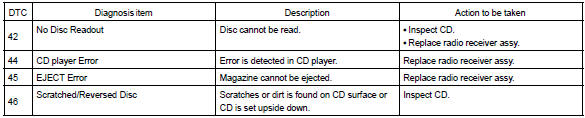
- Logical address: 62 (cd player)
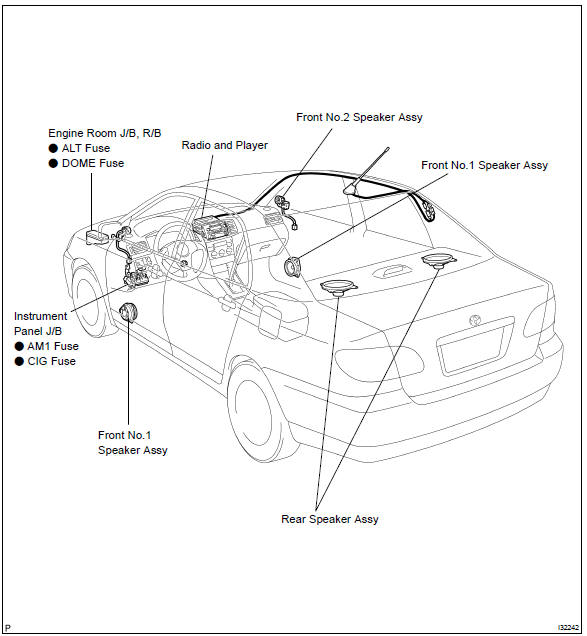
Location


Other materials:
Overhaul
Hint:
installation is in the reveres order of the removal. But the
installation is indicated only when it has a
point.
In the rh side, work in the same procedure as in the lh side.
1. Remove rear armrest assy lh
Using a screwdriver, remove the rear armrest.
Hint:
tape the s ...
Replacement
Hint:
installation is in the reverse order of the removal. But the
installation is indicated only when it has a
point.
In the lh side, work in the same procedure as in the rh side.
1. Disconnect battery negative terminal
2. Remove front seat assembly rh
3. Remove front seat inner be ...
Registering a new contact to the contact list
New contact data can be registered. Up to 4 numbers per person can be registered.
For PBAP compatible Bluetooth® phones, this function is available when “Automatic
Contact/History Transfer” is set to off.
1 Select “New Contact”.
2 Enter the name and select “OK”.
3 Enter the phone ...