
Toyota Corolla (E120) 2002–2008 Repair Manual / Diagnostics / Sfi system / Readiness monitor drive pattern / Catalyst monitor (o2s type)
Toyota Corolla (E120): Catalyst monitor (o2s type)
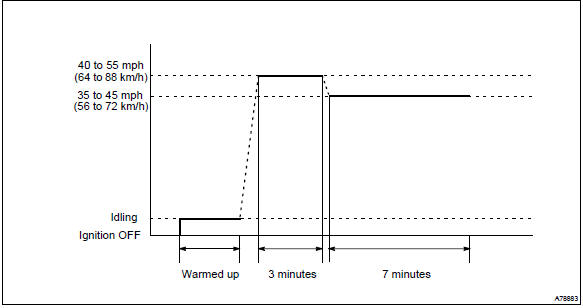
- Preconditions
The monitor will not run unless:
- mil is off.
- Engine coolant temperature (ect) is 176°f (80 °C) or greater.
- Intake air temperature (iat) is 14°f (–10 °C) or greater.*
Notice
: * 2002 and later my vehicles: the readiness test can be completed in cold ambient conditions (less than 14°f / –10 °C), if the drive pattern is repeated a second time after cycling the ignition off.
- Drive pattern
- connect the obd ii scan tool to the dlc3 to check monitor status and preconditions.
- Drive the vehicle at 40 to 55 mph (64 to 88 km/h) for approximately 3 minutes.
Notice
: drive with smooth throttle operation and avoid sudden acceleration.
If iat is less than 50°f (10 °C) when starting engine, continue to drive vehicle at 40 to 55 mph (64 to 88km/h) for approximately 4 minutes.
- Drive the vehicle at 35 to 45 mph (56 to 72 km/h) for approximately 7 minutes.
Notice
: drive with smooth throttle operation and avoid sudden deceleration as much as possible with the throttle fully closed.
- If readiness status dose not switch to complete, make sure that the preconditions are met and the ignition switch is turned off and then repeat steps (2) and (3).
- Release pressure in the fuel tank by removing and then reinstalling the fuel tank cap.
- Start the engine and immediately begin driving as directed.


Other materials:
Exhaust gas precautions
Harmful substance to the
human body is included in
exhaust gases if inhaled.
WARNING
Exhaust gases include harmful
carbon monoxide (CO), which is
colorless and odorless. Observe
the following precautions.
Failure to do so may cause
exhaust gases enter the vehicle
and may lead to an accident
caused ...
Rear seats
The seatbacks of the rear seats can be folded down.
The seatbacks of the rear seats can be folded down.
1 Stow the rear outside seat belt buckles and stow the rear center seat belt
buckle as shown.
2 Pull the seatback lock release knob and fold the seatback down.
CAUTION
■When foldi ...
Emergency towing
If a tow truck is not available in an emergency, your vehicle may be temporarily
towed using a cable or chain secured to the emergency towing eyelet. This should
only be attempted on hard surfaced roads for short distances at low speeds.
A driver must be in the vehicle to steer and operate the ...