
Toyota Corolla (E120) 2002–2008 Repair Manual / Brake / Brake fluid
Toyota Corolla (E120): Brake fluid
Bleeding
Notice
: wash the brake fluid off immediately if it comes into contact with any painted surface. Hint
: if any work is done on the brake system or if air in the brake lines is suspected, bleed the air from the system.
1. Fill reservoir with brake fluid fluid: sae j1703 or fmvss no. 116 Dot3
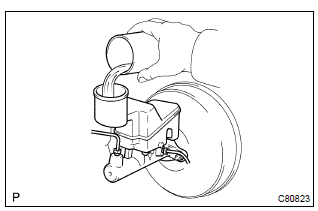
2. Bleed master cylinder
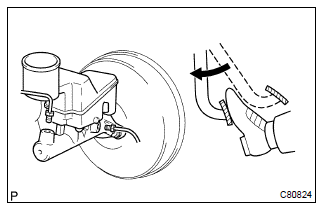
Hint
: if the master cylinder has been disassembled or if the reservoir becomes empty, bleed the air from the master cylinder.
- disconnect the brake lines from the master cylinder.
Sst 09023–00100
- slowly depress the brake pedal and hold it.
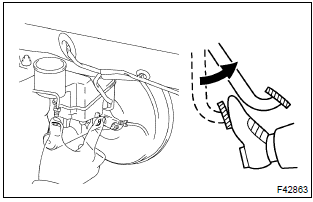
- Block off the outer holes with your fingers, and release the brake pedal.
- repeat (b) and (c) 3 or 4 times.
3. Bleed brake line
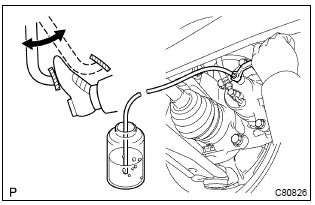
- Connect the vinyl tube to the brake caliper.
- depress the brake pedal several times, then loosen the bleeder plug with the pedal held down.
- at the point when fluid stops coming out, tighten the
bleeder plug, then release the brake pedal.
Torque: 8.3 Nvm (85 Kgf·cm, 74 in.Vlbf)
- repeat (b) and (c) until all the air in the fluid has been bled out.
- Repeat the above procedures to bleed the air out of the brake line for each wheel.
4. Check fluid level in reservoir
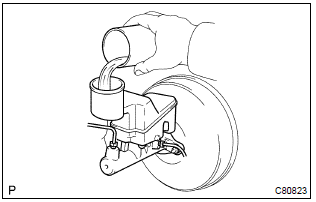
- Check the fluid level and add fluid if necessary.
Fluid: sae j1703 or fmvss no. 116 Dot3


Other materials:
Circuit description
Refer to dtc p0115
Dtc no.
Dtc detection condition
Trouble area
P0116
If engine coolant temperature (ect) was between 35 c (95 °F)
and 60 c (140 °F) when starting the engine, and also conditions
(a) and (b) are met:
vehicle has run with acceleration an ...
Update contacts from phone
Operation methods differ between PBAP compatible and PBAP incompatible but OPP
compatible Bluetooth® phones.
If your cellular phone is neither PBAP nor OPP compatible, the contacts cannot
be transferred.
■ For PBAP Compatible Bluetooth® Phones
1 Select “Update Contacts from Phone” ...
Blind Spot Monitor operation
■ Objects that can be detected while driving
The Blind Spot Monitor uses rear side radar sensors to detect the following
vehicles traveling in adjacent lanes and advises the driver of
the presence of such vehicles via the indicators on the outside rear
view mirrors.
Vehicles that are traveling ...