
Toyota Corolla (E170) 2014–2019 Owners Manual / Interior features / Setup (Multimedia system) / Audio settings
Toyota Corolla (E170): Audio settings
Settings are available for adjusting the radio operation, cover art, etc.
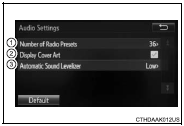
Screen for audio settings
1 Press the “SETUP” button.
2 Select “Audio” on the “Setup” screen.
1Number of Radio Presets Select the number of radio preset stations.
2 Display Cover Art on/off 3 Automatic Sound Levelizer


Other materials:
Overhaul
1. Remove manual transaxle assy
2. Remove clutch release fork sub–assy
Remove the clutch release fork with clutch release bearing
from the transaxle assy.
3. Remove clutch release bearing assy
remove the clutch release bearing assy from the clutch
release fork.
4. Re ...
Power outlet
The power outlet can be used
for 12 V accessories that run on
less than 10 A.
Lift the lid while pulling up the
knob and open the power outlet
lid.
■The power outlet can be used
when
The engine switch is in ACC or ON.
■When turning the engine switch
off
Disconnect electrical devices with
charg ...
General maintenance
Listed below are the general
maintenance items that
should be performed at the
intervals specified in the
"Owner's Warranty Information
Booklet" or "Owner's
Manual Supplement/Scheduled
Maintenance Guide". It
is recommended that any
problem you notice should
be brought to the attention
of your Toyota ...