
Toyota Corolla (E170): Vanity mirrors
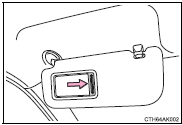
Slide the cover.


Other materials:
Replacement
1. Remove clutch start switch assy
disconnect the clutch start switch assy connector.
remove the nut and clutch start switch assy from the clutch pedal
support.
2. Install clutch start switch assy
install the clutch start switch assy with the nut.
Torque: 15.68 Nv ...
How to proceed with troubleshooting
Hint:
troubleshooting of the wireless door lock control system is based on
the premise that the power door
lock system is operating normally. Therefore, before troubleshooting the
wireless door lock control system,
first make certain that the the power door lock system is operating
...
Emission inspection and maintenance (I/M) programs
Some states have vehicle
emission inspection programs
which include OBD
(On Board Diagnostics)
checks. The OBD system
monitors the operation of
the emission control system.
If the malfunction indicator
lamp comes on
The OBD system determines
that a problem exists somewhere
in the emission control
sy ...