
Toyota Corolla (E170) 2014–2019 Owners Manual / When trouble arises / Essential information / If your vehicle has to be stopped in an emergency
Toyota Corolla (E170): If your vehicle has to be stopped in an emergency
Only in an emergency, such as if it becomes impossible to stop the vehicle in the normal way, stop the vehicle using the following procedure:
1 Steadily step on the brake pedal with both feet and firmly depress it.
Do not pump the brake pedal repeatedly as this will increase the effort required to slow the vehicle.
2 Shift the shift lever to N.
► If the shift lever is shifted to N
3 After slowing down, stop the vehicle in a safe place by the road.
4 Stop the engine.
► If the shift lever cannot be shifted to N
3 Keep depressing the brake pedal with both feet to reduce vehicle speed as much as possible.
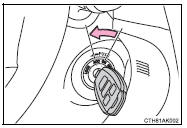
4 Vehicles without a smart key system: Stop the engine by turning the engine switch to the “ACC” position.
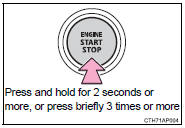
4 Vehicles with a smart key system: To stop the engine, press and hold the engine switch for 2 consecutive seconds or more, or press it briefly 3 times or more in succession.
5 Stop the vehicle in a safe place by the road.
CAUTION
■If the engine has to be turned off while driving
●Power assist for the brakes and steering wheel will be lost, making the brake pedal harder to depress and the steering wheel heavier to turn.
Decelerate as much as possible before turning off the engine.
●Vehicles without a smart key system: Never attempt to remove the key, as doing so will lock the steering wheel.


Other materials:
Inspection and adjustment procedure
1 Tire valve
2 Tire pressure gauge
1 Remove the tire valve cap.
2 Press the tip of the tire pressure gauge onto the tire valve.
3 Read the pressure using the gauge gradations.
4 If the tire inflation pressure is not at the recommended level, adjust the pressure.
If you add too much air, pres ...
Selecting tire chains
Use the correct tire chain size when mounting the tire chains.
Chain size is regulated for each
tire size.
Side chain (0.12 in. [3 mm] in
diameter)
Side chain (0.39 in. [10 mm]
in width)
Side chain (1.18 in. [30 mm]
in length)
Cross chain (0.16 in. [4 mm]
in diameter)
Cross chain (0.55 i ...
Sound setting
1 Display the “Phone/Message Settings” screen. 2 Select “Sound Settings” on the
“Phone/Message Settings” screen.
1 Set the desired ringtone.
2 Adjust the ringtone volume.
3 Adjust the message readout volume.
4 Set the desired incoming SMS/MMS tone.
5 Adjust the incoming SMS/ MMS t ...