
Toyota Corolla (E120) 2002–2008 Repair Manual / Diagnostics / Supplemental restraint system / Short in p squib circuit (to ground) / Inspection procedure
Toyota Corolla (E120): Inspection procedure
1 Check p squib circuit(airbag sensor assy center – instrument panel passenger airbag assy)
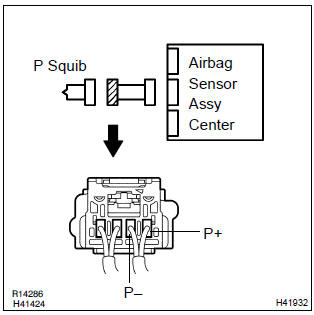
- Disconnect the negative (–) terminal cable from the battery, and wait at least for 90 seconds.
- disconnect the connectors between the airbag sensor assy center and the instrument panel passenger airbag assy.
- for the connector (on the instrument panel passenger airbag
assy side) between the airbag sensor assy center
and the instrument panel passenger airbag assy, measure
the resistance between p+ and body ground.
Ok: resistance: 1 mΩ or higher


2 Check air bag sensor assy center
Sst 09843–18040
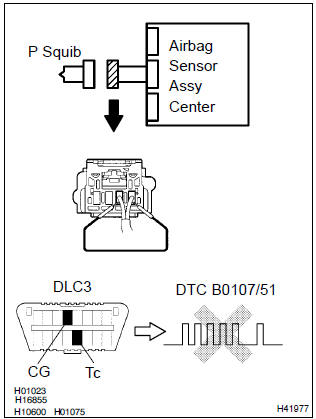
- Connect the connector to the airbag sensor assy center.
- using a service wire, connect p+ and p– of the connector (on the instrument panel passenger airbag assy side) between the airbag sensor assy center and the instrument panel passenger airbag assy.
- connect the negative (–) terminal cable to the battery, and wait at least for 2 seconds.
- turn the ignition switch to on, and wait at least for 20 seconds.
- clear the dtc stored in memory .
- turn the ignition switch to lock, and wait at least for 20 seconds.
- turn the ignition switch to on, and wait at least for 20 seconds.
- check the dtc .
Ok: dtc b0107/51 is not output.
Hint
: codes other than code b0107/51 may be output at this time, but they are not relevant to this check.


3 Check p squib
Sst 09843–18040
- Turn the ignition switch to lock.
- disconnect the negative (–) terminal cable from the battery, and wait at least for 90 seconds.
- connect the instrument panel passenger airbag assy connector.
- connect the negative (–) terminal cable to the battery, and wait at least for 2 seconds.
- turn the ignition switch to on, and wait at least for 20 seconds.
- clear the dtc stored in memory .
- turn the ignition switch to lock, and wait at least for 20 seconds.
- turn the ignition switch to on, and wait at least for 20 seconds.
- check the dtc .
Ok: dtc b0107/51 is not output.
Hint: codes other than code b0107/51 may be output at this time, but they are not relevant to this check.


4 Use simulation method to check


Replace all srs components including the wire harness


Other materials:
Keys
The following keys are provided
with the vehicle.
Type A
Keys (without a wireless
remote control function)
Key number plate
Type B
Keys (with a wireless remote
control function)
Operating the wireless remote control
function
Key number plate
Type C
Electronic keys
Operating the sm ...
Registering a Bluetooth® phone for the first time
To use the hands-free system, it is necessary to register a Bluetooth® phone
with the system.
Once the phone has been registered, it is possible to use the hands-free system.
For details about registering a Bluetooth® device
1 Turn the Bluetooth® connection setting of your cellular phone on. ...
Pre–check
1. Srs warning light check
Turn the ignition switch to the on position and check that
the srs warning light lights up.
check that the srs warning light goes out after approx.
6 Seconds.
Hint:
when the ignition switch is at on and the srs warning
light remains on or flashes, the ...