
Toyota Corolla (E170) 2014–2019 Owners Manual / Interior features / Using Bluetooth® devices / Bluetooth® audio/phone / Device registration/connection flow
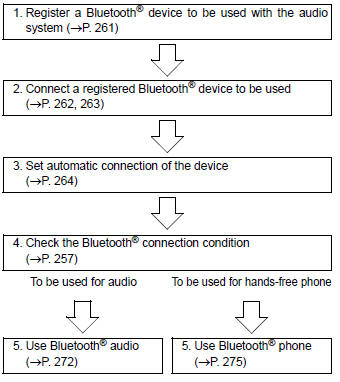
Toyota Corolla (E170): Device registration/connection flow


Other materials:
Adjustment
Hint:
in the rh side, work in the same procedure as in the lh
side.
Since the centering bolt is used as a door side hinge bolt,
the door hinge cannot be adjusted with it on. Substitute
the bolt with washer for the centering bolt.
1. Inspect front door panel sub–assy lh
Che ...
Air outlet layout and operations
■ Location of air outlets
The air outlets and air volume
changes according to the
selected air flow mode.
:If equipped
■ Adjusting the position of
and opening and closing
the air outlets
Front center
Direct air flow to the left or right, up
or down
Front right-hand side
Direct air flow to th ...
Circuit description
The p/t squib (rh) circuit consists of the airbag sensor assy center and seat
belt pretensioner (rh).
It causes the srs to deploy when the srs deployment conditions are satisfied.
Dtc b0130/63 is recorded when a short is detected in the p/t squib (rh) circuit.
Wiring diagram
...