
Toyota Corolla (E120): Clock assy
Replacement
1. Remove console panel upper
2. Remove heater control knob
3. Remove instrument cluster finish panel
4. Remove clock assy
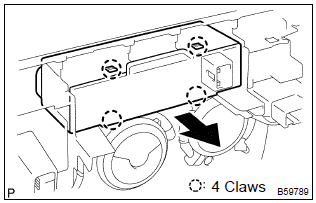
- Using a screwdriver, disengage the 4 claws, remove the clock as shown in the illustration.
Hint
: tape the screwdriver tip before use.


Other materials:
General information
There are many ecu controlled systems used in the corolla. In general, ecu
controlled system are considered
to be very intricate and require a high level of technical knowledge and expert
skill to troubleshoot.
The fact is, however, that if you proceed by inspecting the circuits one by one, ...
Inspection
1. Cooler thermistor no.1
Check resistance between terminals 1 and 2 of cooler
thermistor no. 1 At each temperature, as shown in the
chart.
Resistance:
If resistance value is not as specified, replace the sensor.
2. Cooler and accessory assy
Inspect blower switch contin ...
On–vehicle inspection
1. Inspect front axle hub bearing
remove the front wheel.
separate the front disc brake caliper assy .
remove the front disc.
inspect the bearing backlash.
Using a dial indicator, check the backlash near the
center of the axle hub.
Maximum: 0.05 Mm (0. ...