
Toyota Corolla (E170) 2014–2019 Owners Manual / Operation of each component / Adjusting the seats / Inside rear view mirror / Anti-glare function
Toyota Corolla (E170): Anti-glare function
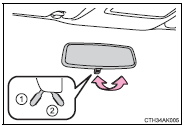
► Manual anti-glare inside rear view mirror
Reflected light from the headlights of vehicles behind can be reduced by operating the lever.
1 Normal position
2 Anti-glare position
► Auto anti-glare inside rear view mirror
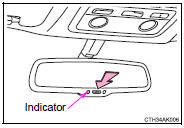
Responding to the level of brightness of the headlights of vehicles behind, the reflected light is automatically reduced.
Changing automatic anti-glare function mode
On/off
When the automatic anti-glare function is in ON mode, the indicator illuminates.
Vehicles without a smart key system: The function will set to ON mode each time the engine switch is turned to the “ON” position.
Pressing the button turns the function to OFF mode. (The indicator also turns off.) Vehicles with a smart key system: The function will set to ON mode each time the engine switch is turned to IGNITION ON mode.
Pressing the button turns the function to OFF mode. (The indicator also turns off.)
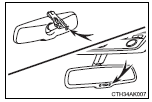
■To prevent sensor error (vehicles with an auto anti-glare inside rear view mirror)
To ensure that the sensors operate properly, do not touch or cover them.
CAUTION
Do not adjust the position of the mirror while driving.
Doing so may lead to mishandling of the vehicle and cause an accident, resulting in death or serious injury.


Other materials:
Starting system
Inspection
1. Inspect starter assy
Notice:
these tests must be performed within 3 to 5 seconds to
prevent burnout of the coil.
perform the pull–in test.
Remove the nut, then disconnect the lead wire from
terminal c.
Connect the battery to the starter repai ...
Air bag sensor front lh
Components
Replacement
Hint: components:
1. Precaution
2. Disconnect battery negative terminal
3. Remove air bag sensor front lh
Disconnect the connector from the airbag sensor front
lh.
remove the 2 bolts and airbag sensor front lh.
4. Inspect air bag sensor front lh
...
Vehicle information
This screen can be used to display the fuel consumption.
“Trip Information” or “Past Record” screen
Press “CAR” to display the “Trip Information” or “Past Record” screen.
Fuel consumption
■ Trip information
If the “Trip Information” screen does not appear, select â ...