
Toyota Corolla (E120) 2002–2008 Repair Manual / Diagnostics / Audio system / Turning on light switch does not light up night time
illumination of radio receiver
Toyota Corolla (E120): Turning on light switch does not light up night time illumination of radio receiver
Wiring diagram
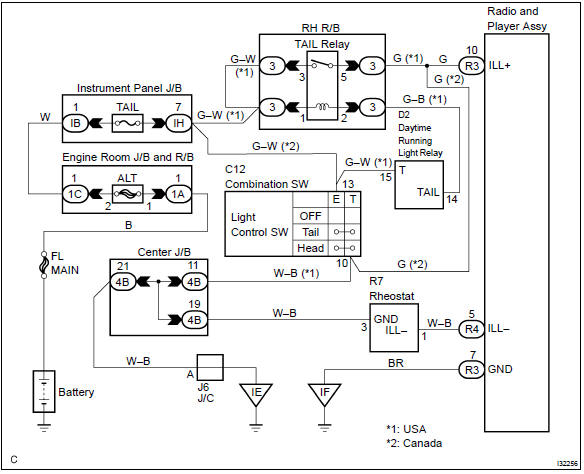
Inspection procedure
1 Inspect radio receiver assy(ill+, ill–)
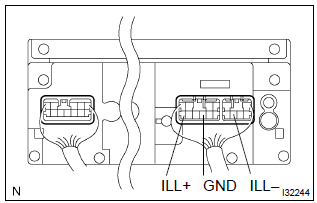
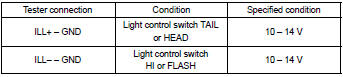
- Check that the voltage between terminals at each condition, as shown in the chart.
Standard:


Repair or replace harness or connector


Other materials:
Connecting a Bluetooth® device
Up to 5 Bluetooth® devices (Phones (HFP) and audio players (AVP)) can be registered.
If more than 1 Bluetooth® device has been registered, select which device to
connect to.
1 Press the “SETUP” button.
2 Select “Bluetooth*”.
*: Bluetooth is a registered trademark of Bluetooth SIG, In ...
Adjustment
1. Put vehicle these conditions
tire inflation pressure is the specified value .
start the engine.
2. Adjust fog light aim
The fog light aim can be adjusting by moving the aiming
screw in the vertical direction.
Hint:
the optical aim moves upward when turning a scr ...
Front differential oil seal (atm)
Replacement
1. Remove front wheels
2. Remove engine under cover rh
3. Remove engine under cover lh
4. Drain automatic transaxle fluid
remove the drain plug, gasket and drain atf.
install a new gasket and drain plug.
Torque: 17.5 Nvm (178 Kgf·cm, 13 ft·lbf)
5. Remove fron ...