
Toyota Corolla (E120): Replacement
1. Drain engine oil
- remove the oil pan drain plug and drain the engine oil.
2. Removal & installation chain sub–assy
3. Remove chain vibration damper no.1
- remove 2 bolts and chain vibration damper no. 1.
4. Remove oil pump assy
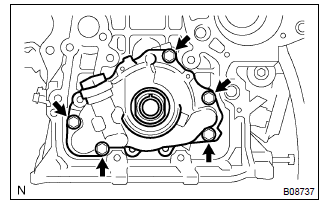
- Remove the 5 bolts.
- remove the oil pump assy and gasket.
5. Install oil pump assy
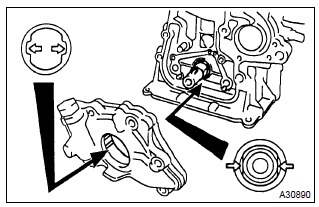
- Place a new gasket on the cylinder block.
- engage the spline teeth of the oil pump drive rotor with the large teeth of the crankshaft, and side the oil pump.
- install the oil pump with the 5 bolts.
Torque: 9.0 Nvm (92 Kgf·cm, 80 in.Vlbf)
6. Install chain vibration damper no.
1
- install the chain vibration damper no. 1 With 2 bolts.
Torque: 9.0 Nvm (92 Kgf·cm, 8.0 In.Vlbf)
7. Install oil pan drain plug
- clean and install the oil pan drain plug with a new gasket.
Torque: 37 nvm (377 Kgf·cm, 27 ft·lbf)
8. Add engine oil
Capacity:
drain and refill w/ oil filter change 3.7 Liters (3.9 Us qts, 3.3 Lmp. Qts)
drain and refill w/o oil filter change 3.5 Liters (3.7 Us qts, 3.1 Lmp. Qts)
dry fill 4.2 Liters (4.4 Us qts, 3.7 Lmp. Qts)
9. Add coolant(seepage 16–7)
10. Inspect oil leak
11. Inspect check engine coolant leak


Other materials:
Installing the spare tire
1 Remove any dirt or foreign matter from the wheel contact surface.
If foreign matter is on the wheel contact surface, the wheel nuts may loosen
while the vehicle is in motion, causing the tire to come off.
2 Install the tire and loosely tighten each wheel nut by hand by approximately
the sa ...
On–vehicle inspection
1. Inspect cooling system for leaks
Caution:
to avoid the danger of being burned, do not remove the radiator
cap while the engine and radiator are still hot, as fluid
and steam can be blown out under pressure.
fill the radiator with coolant and attach a radiator cap tester.
...
Cd cannot be inserted or is ejected right after
insertion
Wiring diagram
Inspection procedure
1 Check if a proper cd is inserted
Check that a proper cd is inserted.
Make sure that the cd is normal audio cd, and that there is no
deformation, flaw, stain, burr and
other defects on the cd.
Standard: normal audio cd.
Reference:
...