
Toyota Corolla (E120) 2002–2008 Repair Manual / Exterior/interior trim / Out side moulding
Toyota Corolla (E120): Out side moulding
Replacement
Hint
: use the same procedures for the rh side and lh side.
1. Remove outside moulding
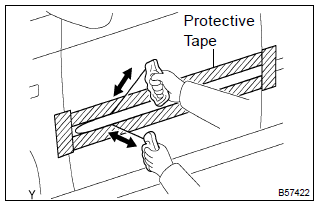
- Put protective tape around the moulding.
- insert a piano wire between the vehicle body and moulding.
- tie objects that can serve as handles (for example, wooden blocks) to all wire ends.
- pull the piano wire and scrape off the double–sided tape that holds the moulding to the vehicle body.
Notice
:
- if reusing the moulding, take care not to damage the moulding.
- Becareful not to damage the body.
- remove the moulding.
2. Install outside moulding lh
- using a heat light, heat the body.
Heating temperature: 40 to 60 c (104 to 140 f)
Notice
: do not heat the body excessively.
- remove the double–sided tape from the body.
- wipe off the stains with cleaner.
- clean the moulding (if reusing).
- Using a heat light, heat the body.
Heating temperature: 20 to 30 c (68 to 86 f).
Notice
: do not heat the moulding excessively.
- Remove the double–sided tape from the moulding.
- Wipe off the stains with cleaner.
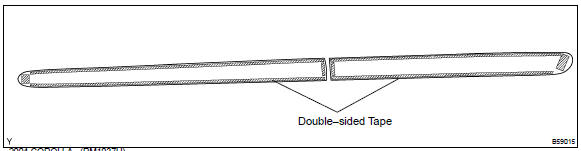
- Apply new adhesive tape to the moulding as shown in the illustration.
- Using a heat light, heat the body and moulding.
Heating temperature:

Notice
: do not heat the body and moulding excessively.
- remove the peeling paper from the double–sided tape on
the moulding face.
Notice
: when the peeling paper is removed, take care that no dirt or dust contaminates the adhesive.
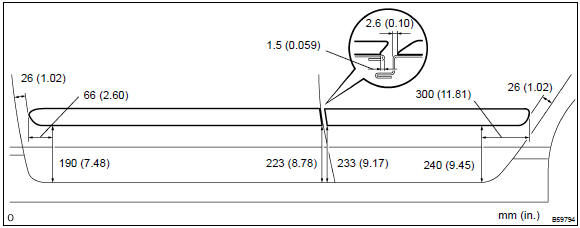
- affix the moulding to the body, as shown in the illustration.
Notice
: do not apply excessive force onto the moulding. Use steady pressure with your thumbs.


Other materials:
For vehicles equipped with srs airbag and seat belt pretensioner
Hint:
the vehicle is equipped with an srs (supplemental restraint system), such as the
horn button assembly,
the instrument panel passenger airbag assembly, the front seat airbag assembly,
the center airbag sensor
assembly, the front airbag sensor, the side airbag sensor and the seat belt
p ...
Overhaul
Hint:
installation is in the reveres order of the removal. But the
installation is indicated only when it has a
point.
In the rh side, work in the same procedure as in the lh side.
1. Remove rear armrest assy lh
Using a screwdriver, remove the rear armrest.
Hint:
tape the s ...
Fuel pump shut off system
To minimize the risk of fuel leakage when the engine stalls or when an airbag
inflates upon collision, the fuel pump shut off system stops the supply of fuel
to the engine.
Follow the procedure below to restart the engine after the system is activated.
► Vehicles without a smart key syst ...