
Toyota Corolla (E120) 2002–2008 Repair Manual / Lubrication / Lubrication system
Toyota Corolla (E120): Lubrication system
On–vehicle inspection
1. Check engine oil level
- after warming up the engine and then 5 minutes after the engine stops, oil level should be between the ”l” and ”f” marks on the oil level gage.
If low, check for leakage and add oil up to the ”f” mark.
Notice
: do not fill with engine oil above the ”f” mark.
2. Check engine oil quality
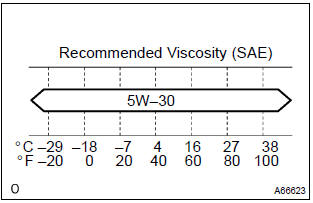
- Check the oil for deterioration, entry of water, discoloring or thinning.
If the quality is visibly poor, replace the oil.
Oil grade: use api grade sl ”energy–conserving”, or ilsac multigrade engine oil.
Sae 5w–30 is the best choice for good fuel economy, and good starting in cold weather.
If sae 5w–30 is not available, sae 10w–30 may be used.
However, it should be replaced with sae 5w–30 at the next oil replacement.
3. Inspect oil pressure
- disconnect the oil pressure switch connector.
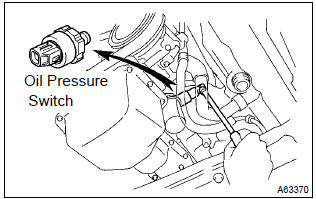
- Using a 24 mm deep socket wrench, remove the oil pressure switch.
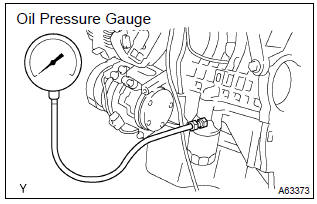
- Install the oil pressure gauge.
- warm up the engine.
- inspect the oil pressure.
Oil pressure:

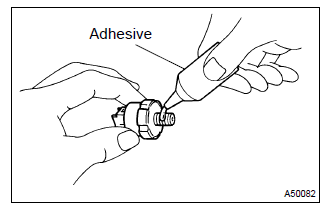
- Apply adhesive to 2 or 3 threads of the oil pressure switch.
Adhesive:
part no. 08833–00080, Three bond 1344, loctite 242 or equivalent - using a 24 mm deep socket wrench, install the oil pressure
switch.
Torque: 15 nvm (153 Kgf·cm, 11 ft·lbf)
- connect the oil pressure switch connector.
- check for the engine oil leaks.


Other materials:
Bluetooth® phone message function
Received messages can be forwarded from the connected Bluetooth® phone, enabling
checking and replying using the multimedia system.
Depending on the type of Bluetooth® phone connected, received messages may not
be transferred to the message inbox.
If the phone does not support the message fu ...
Cigarette lighter assy
Replacement
Hint: components:
1. Remove floor shift shift lever knob sub–assy (m/t transaxle)
2. Remove console panel upper
3. Remove cigarette lighter cover
Disengage the 2 claws and remove the cigarette lighter
cover.
4. Remove cigarette lighter assy
Turn the socket in ...
Inspection procedure
1 Check d squib circuit(airbag sensor assy center – horn button
assy)
Disconnect the negative (–) terminal cable from the battery,
and wait at least for 90 seconds.
disconnect the connectors between the horn button assy
and the airbag sensor assy center.
for the oran ...