
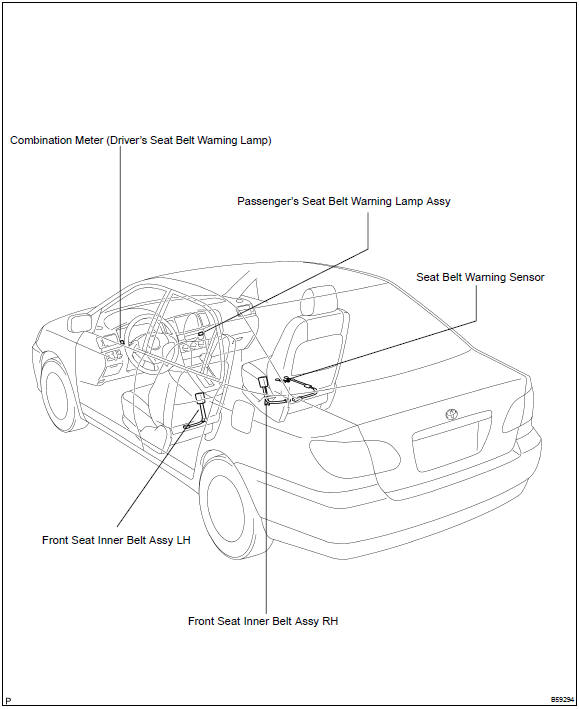
Toyota Corolla (E120): Location
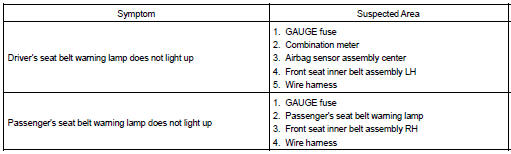
Problem symptoms table


Other materials:
Cup holders
Front
Rear (if equipped)
Pull the armrest down.
WARNING
■Items unsuitable for the cup
holder
Do not place anything other than
cups or beverage cans in the cup
holders.
Other items may be thrown out of
the holders in the event of an
accident or sudden braking and
cause injury. If possible, cover ...
Cruise control actuator assy
Replacement
1. Remove cruise control actuator cover
Disengage the 2 claws, then remove the cruise control actuator
cover.
2. Separate accelerator control cable assy
Loosen the double nut and separate the accelerator control
cable assy.
3. Separate accelerator auto drive ca ...
Wireless charger (if
equipped)
A portable device, such as a
smartphone or mobile battery,
can be charged by just placing it
on the charging area, provided
the device is compatible with the
Qi wireless charging standard
created by the Wireless Power
Consortium.
The wireless charger cannot be
used with a portable device that is la ...