
Toyota Corolla (E120): Inspection procedure
1 Inspect fuse(ecu–ig fuse)
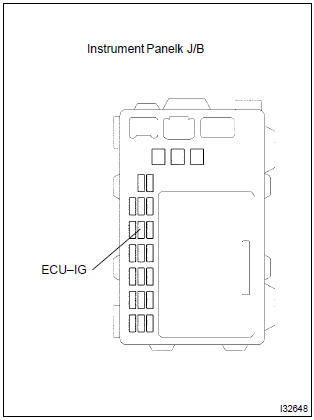
- Remove ecu–ig fuse from the instrument panel j/b.
- check continuity of ecu–ig fuse.
Ok: continuity


2 Inspect battery
Ok: voltage: 10 – 14 v


3 Inspect skid control ecu connector(ig1 terminal voltage)
In case of using hand–held tester:
- check the voltage condition output from the ecu displayed on the
hand–held tester.
Ok: ”normal” is displayed.
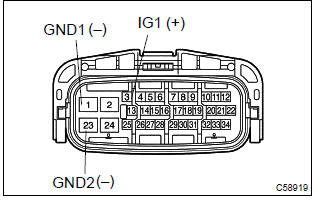
In case of not using hand–held tester:
- disconnect the skid control ecu connector.
- turn the ignition switch to on.
- measure voltage between terminals ig1 (3) and gnd (1,
23) of skid control ecu harness side connector.
Ok: oltage: 10 – 14 v


4 Inspect skid control ecu connector(gnd terminal continuity)
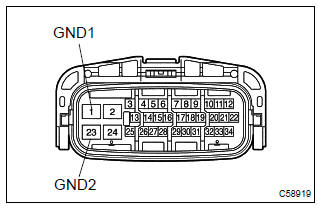
Measure resistance between terminal gnd (1, 23) of skid control ecu harness side connector and body ground.
Ok: resistance: 1 Ω or less


Check and replace brake actuator assy


Other materials:
Overhaul
1. Remove oil pump relief valve
Remove the oil pump relief valve plug, oil pump relief
valve spring and oil pump relief valve.
Oil pump relief valve plug
oil pump relief valve spring
oil pump relief valve
2. Inspect oil pump assy
Remove 3 screws and o ...
Starting & charging
Preparation
Sst
Recomended tools
Equipment
...
Inspection procedure
1 Check p squib circuit(airbag sensor assy center – instrument
panel passenger airbag assy)
Disconnect the negative (–) terminal cable from the battery,
and wait at least for 90 seconds.
disconnect the connector between the airbag sensor
assy center and the instrument panel ...