
Toyota Corolla (E170) 2014–2019 Owners Manual / Interior features / Other interior features / Compass / Displays and directions
Toyota Corolla (E170): Displays and directions
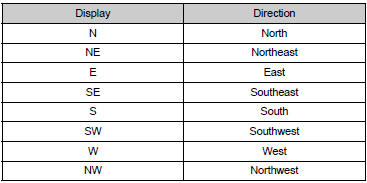


Other materials:
Inspection procedure
Hint:
hand–held tester only:
narrowing down the trouble area is possible by performing ”a/f control” active
test (heated oxygen
sensor or other trouble areas can be distinguished).
Perform active test using hand–held tester (a/f control).
Hint:
”a/f control” is the active te ...
Rear suspension
Preparation
Sst
Recomended tools
Equipment
Tire & wheel
Preparation
Equipment
...
BSM (Blind Spot Monitor)
The Blind Spot Monitor is a
system that uses rear side
radar sensors installed on
the inner side of the rear
bumper on the left and right
side to assist the driver in
confirming safety when
changing lanes.
WARNING
■Cautions regarding the use of
the system
The driver is solely responsible
for sa ...