
Toyota Corolla (E120) 2002–2008 Repair Manual / Diagnostics / Cruise control system / Diagnostic trouble code chart
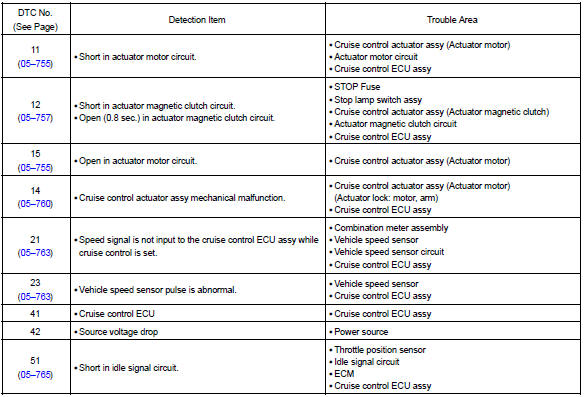
Toyota Corolla (E120): Diagnostic trouble code chart
Diagnostic trouble code chart
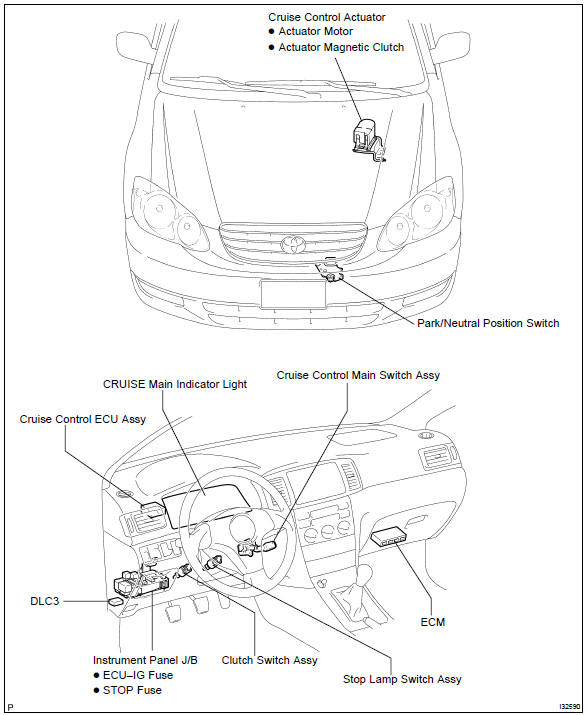
Location


Other materials:
Stopping the engine
1 Stop the vehicle.
2 Continuously variable transmission: Shift the shift lever to P.
Manual transmission: Shift the shift lever to N.
3 Set the parking brake. 4 Press the engine switch.
5 Vehicles without a multi-information display: Release the brake pedal (continuously
variable transmission ...
Circuit description
Monitor description
The ecm commands gearshift by turning the shift solenoid valves ”on/off”.
When there is an open or short
circuit in any shift solenoid valve circuit, the ecm detects the problem and the
mil comes on. Illuminating
the mil, the ecm performs the fail–safe and turns ...
Driving assist systems
To help enhance driving safety and performance, the following systems operate
automatically in response to various driving situations. Be aware, however, that
these systems are supplementary and should not be relied upon too heavily when operating
the vehicle.
◆ ABS (Anti-lock Brake Sys ...