
Toyota Corolla (E170) 2014–2019 Owners Manual / When trouble arises / Steps to take in an emergency / If you have a flat tire / Location of the spare tire, jack and tools
Toyota Corolla (E170): Location of the spare tire, jack and tools
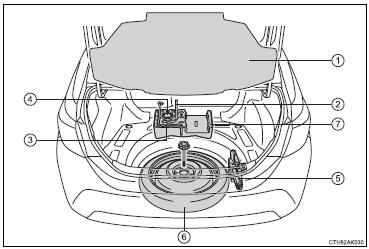
1 Luggage floor cover
2 Wheel nut wrench
3 Jack handle
4 Jack attachment*
5 Jack
6 Spare tire
7 Tool tray
*: The jack attachment is used when raising your vehicle with a floor jack.
CAUTION
■Using the tire jack
Observe the following precautions.
Improper use of the tire jack may cause the vehicle to suddenly fall off the jack, leading to death or serious injury.
●Do not use the tire jack for any purpose other than replacing tires or installing and removing tire chains.
●Only use the tire jack that comes with this vehicle for replacing a flat tire.
Do not use it on other vehicles, and do not use other tire jacks for replacing tires on this vehicle.
●Put the jack properly in its jack point.
●Do not put any part of your body under the vehicle while it is supported by the jack.
●Do not start the engine or drive the vehicle while the vehicle is supported by the jack.
●Do not raise the vehicle while someone is inside.
●When raising the vehicle, do not put an object on or under the jack.
●Do not raise the vehicle to a height greater than that required to replace the tire.
●Use a jack stand if it is necessary to get under the vehicle.
●When lowering the vehicle, make sure that there is no-one near the vehicle. If there are people nearby, warn them vocally before lowering.


Other materials:
Inspection procedure
1 Check side squib(rh) circuit(airbag sensor assy center – front
seat airbag assy rh)
Disconnect the negative (–) terminal cable from the battery,
and wait at least for 90 seconds.
disconnect the connectors between the front seat airbag
assy (rh) and the airbag sensor assy center. ...
Registering a new contact to the contact list
New contact data can be registered. Up to 4 numbers per person can be registered.
For PBAP compatible Bluetooth® phones, this function is available when “Automatic
Contact/History Transfer” is set to off.
1 Select “New Contact”.
2 Enter the name and select “OK”.
3 Enter the phone ...
Eco Driving Indicator Light customization (except vehicles with a manual transmission)
Eco Driving Indicator Light can be activated or deactivated.
1 While the odometer is being displayed, press and hold the “DISP” switch to
display the Eco Driving Indicator Light customization screen.
2 Press the “DISP” switch to set Eco Driving Indicator Light to on or off.
3 Press and ...