
Toyota Corolla (E120) 2002–2008 Repair Manual / Diagnostics / Cruise control system / Stop light switch circuit / Circuit description
Toyota Corolla (E120): Circuit description
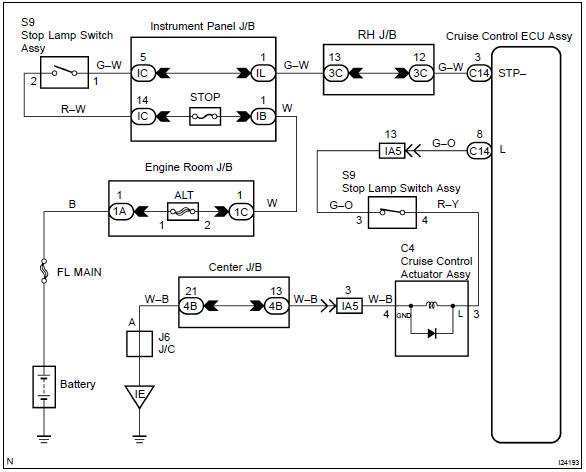
When the brake pedal is depressed, the stop lamp switch assy sends a signal to the cruise control ecu assy.
When the cruise control ecu assy receives this signal, it cancels the cruise control.
A fail–safe function is provided so that cancel functions normally, even if there is a malfunction in the stop light switch circuit.
The cancel conditions are: battery positive voltage at terminal stp–.
When the brake pedal is depressed, normal battery positive voltage normally is applied through the stop fuse and stop lamp switch assy to terminal stp– of the cruise control ecu assy, and the cruise control ecu assy turns the cruise control to off.
If the harness connected to terminal stp– has an open circuit, terminal stp– will have battery positive voltage and the cruise control will be turned off.
Also, when the brake pedal is depressed, the magnetic clutch circuit is cut mechanically by the stop lamp switch assy, turning the cruise control off.
Wiring diagram


Other materials:
Lower ball joint assy front lh
Replacement
Hint: components:
1. Inspect lower ball joint assy front lh
Jack up front side of the vehicle.
check the rattle of the lower ball joint assy front lh.
2. Remove front wheel
3. Remove front axle hub lh nut
sst 09930–00010
4. Disconnect speed sensor front lh (w/ ...
Inspection procedure
1 Check d squib circuit(airbag sensor assy center – horn button
assy)
Disconnect the negative (–) terminal cable from the battery,
and wait at least for 90 seconds.
disconnect the connectors between the airbag sensor
assy center and the horn button assy.
for the oran ...
On–vehicle inspection
1. Horn button assy (vehicles not involved in
collision)
Check the diagnostic system .
visually check the following item with the horn button assy
(with airbag) installed in the vehicle.
Check cuts, minute cracks or marked discoloration on the
horn button assy top surface and in the ...