
Toyota Corolla (E170) 2014–2019 Owners Manual / Interior features / Setup (Multimedia system) / Voice settings
Toyota Corolla (E170): Voice settings
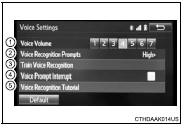
This screen is used for guidance for voice command systems setting.
1 Adjust the voice guidance volume setting.
2 Set the voice recognition prompts “High”, “Low” or “Off”.
3 Set the train voice recognition.
4 Set the voice prompt interrupt on/off.
5 Voice recognition tutorial


Other materials:
Circuit description
Shifting from 1st to o/d is performed in combination with on and off of the
shift solenoid valve s1 and s2
controlled by ecm. If an open or short circuit occurs in either of the solenoid
valves, the ecm controls the
remaining normal solenoid valve to allow the vehicle to be operated smoothly
...
Replacement
Hint: components:
1. Place front wheels facing straight ahead
2. Remove front wheels
3. Remove engine under cover lh
4. Remove engine under cover rh
5. Remove exhaust pipe
6. Drain transaxle oil
7. Remove hood sub–assy
8. Remove cylinder head cover no.2
9. Remove air cleaner assy
10. R ...
Evap monitor (vacuum pressure monitor) (continued)
Preconditions
The monitor will not run unless:
mil is off.
Fuel level is approximately 1/2 to 3/4.
Altitude is 7800 feet (2400 m) or less.*
Engine coolant temperature (ect) is between 40°f and 95°f (4.4 °C and 35
°C).
Intake air temperature (iat) is between 40°f and 95 ...