
Toyota Corolla (E120) 2002–2008 Repair Manual / Theft deterrent & door lock / Transmitter battery
Toyota Corolla (E120): Transmitter battery
Replacement
1. Replace transmitter battery
Notice:
special caution should be taken for handling each component as they are precision electronic components.
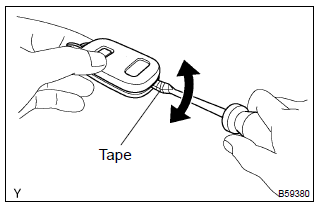
- Using a screwdriver, pry out the transmitter case.
Notice
: do not forcibly pry out the case.
Hint
: tape the screwdriver tip before use.
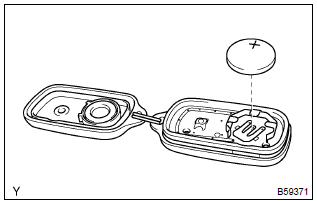
- Remove the battery (lithium battery).
Notice
:
- do not push the terminals with your finger.
- Prying up the battery (lithium battery) to forcibly remove it will cause deformation of the terminals.
- Do not touch the battery with wet hands. Water may cause unexpected rust.
- Do not touch or move any components inside the transmitter as it may interfere with proper operation.
2. Install transmitter battery
- install a new battery (lithium battery) with the positive (+) side up, as shown in the illustration.
Notice
:
- be sure that the positive side and the negative side of the transmitter battery are matched–up correctly.
- Be careful not to bend the electrode of the transmitter battery insertion.
- Be careful that dust or oil does not adhere to the transmitter case.
- install the case securely.


Other materials:
How to use this manual
1. Body panel replacement in this manual
2. Symbols
3. Illustration of weld point symbols
...
Inspection procedure
Hint:
the switch described in this text is a switch for transmitting signals which is
built in the door control transmitter.
1 Check wireless door lock control functions
Normal
2 Replace transmitter battery with normal one
After replacing the transmitter battery with a new or normal o ...
Replacement
Hint: components:
1. Remove front wheel
2. Remove front axle hub lh nut
sst 09930–00010
3. Separate front stabilizer link assy lh
4. Separate speed sensor front lh (w/ abs)
5. Separate front disc brake caliper assy lh
Remove the 2 bolts, separate the brake caliper assy ...