
Toyota Corolla (E120) 2002–2008 Repair Manual / Audio & visual / Power point socket assy rr
Toyota Corolla (E120): Power point socket assy rr
Replacement
Hint
: components:
1. Remove parking brake hole cover sub–assy
2. Remove floor shift shift lever knob sub–assy (m/t transaxle)
3. Remove console panel upper
4. Remove console box carpet
5. Remove console box sub–assy rear (m/t transaxle)
6. Remove console box sub–assy rear (a/t transaxle)
7. Remove power point socket assy rr
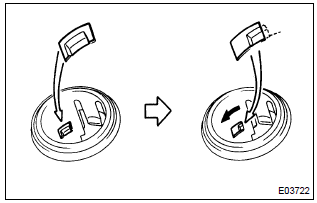
- Turn the socket in the circumference direction as shown the illustration, disengage the claw between the socket and the power outlet socket cover rr, and push out the socket to the room side.
- align the socket with the notch on the power outlet socket cover rr, remove the power point socket assy rr to the room side.
8. Install power point socket assy rr
- align the socket with the notch on the power outlet socket cover rr, push the power point socket assy rr into as hard as possible and install it.


Other materials:
On–vehicle inspection
1. Inspect for electrical door lock operation
Hint:
w/ power window:
the door control switch is built in the master switch in the driver’s door
and also in the passenger’s
door.
W/o power window:
the door control switch is in the driver’s door and also in the passenger’s
d ...
Inspection procedure
Hint:
if different dtcs related to different systems that have terminal e2
as the ground terminal are output
simultaneously, terminal e2 may be open.
Read freeze frame data using the hand-held tester or the obd ii scan
tool. Freeze frame data records
the engine conditions when a malf ...
Monitor description
While the engine is being cranked, the battery positive voltage is applied to
terminal sta of the ecm.
If the ecm detects the starter control signal (sta) while the vehicle is
driving, it will conclude that there is
a fault in the starter control circuit. The ecm will turn on the mil and a d ...