
Toyota Corolla (E120): On–vehicle inspection
1. Check fuel pump operation
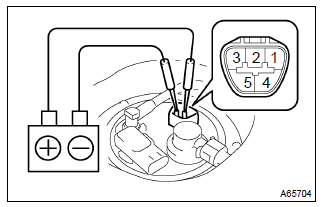
- Connect the hand–held tester to the dlc3.
- turn the ignition switch on and hand–held tester main
switch on.
Notice
: do not start the engine.
- select the active test mode on the hand–held tester.
- please refer to the hand–held tester operator’s manual for further details.
- if you have no hand–held tester, connect the positive (+) lead form the battery to terminal 4 of the connecter, and the negative (–) lead to terminal 5.
Notice
:
- these tests must be done quickly (within 10 seconds) to prevent the coil burning out.
- Keep the fuel pump as far away from the battery as possible.
- Always do the switching at the battery side.
2. Check fuel pressure
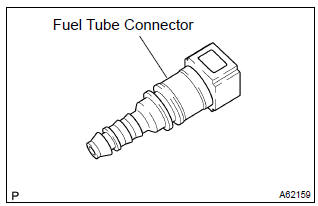
- Prepare for inspection.
- Purchase a new fuel tube, and take out the fuel tube connector from its tube.
Hint
: part no. 23901–0D010
- work for prevent gasoline from spilling out.
- disconnect the efi fuel pipe clamp.
- disconnect the fuel tube from the fuel main tube.
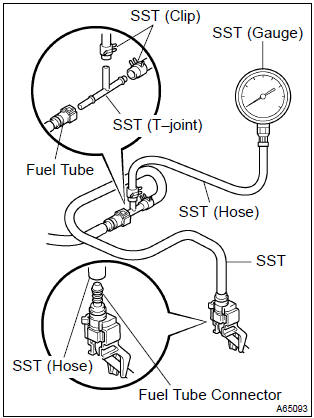
- Install sst (pressure gauge) as shown in the illustration
by using the sst and fuel tube connector.
Sst 09268–41047 (90467–13001, 95336–08070), 09268–45014 (09268–41200, 09268–41220, 09268–41250, 90467–13001)
- wipe off any splattered gasoline.
- ) start the engine.
- measure the fuel pressure at idle.
Fuel pressure: 304 – 343 kpa (3.1 – 3.5 Kgfvcm2, 44 – 50 psi)
- stop the engine.
- check that the fuel pressure remains as specified for 5
minutes after the engine has stopped.
Fuel pressure:
147 kpa (1.5 Kgfvcm2, 21 psi) or more
If pressure is not as specified, check the fuel pump, pressure regulator and/or injectors.
- after checking fuel pressure, disconnect the negative (–) terminal cable from the battery and carefully, remove the sst and fuel tube connector to prevent gasoline from the splashing.
- reconnect the fuel tube to fuel main tube.
- install the efi fuel pipe clamp.
- check fuel leak.


Other materials:
Inspection
1. Windshield wiper switch assy
Continuity check
check the continuity of each terminal of the connector.
Front wiper switch
Standard:
Front washer switch
Standard:
W/o intermittent time adjust:
intermittent operation check
connect the voltmeter (+) te ...
Circuit description
In the diagram below, when the engine is cranked, current flows from terminal
st2 of the ignition switch to
the starter relay coil and also current flows to terminal sta of the ecm (sta
signal).
When the sta signal and ne signal are input to the ecm, tr is turned on, current
flows to the c ...
Location of the storage features
Bottle holders/door pockets
Open trays (if equipped)
Glove box
Cup holders (if equipped)
Console box
WARNING
■Items that should not be left
in the storage spaces
Do not leave glasses,
spray cans in the storage spaces,
as this may cause the following
when cabin temperature becomes
high:
...