
Toyota Corolla (E120) 2002–2008 Repair Manual / Diagnostics / Sfi system / Vehicle speed sensor ”a” / Inspection procedure
Toyota Corolla (E120): Inspection procedure
Hint
: read freeze frame data using the hand-held tester or the obd ii scan tool. Freeze frame data records the engine conditions when a malfunction is detected. When troubleshooting, it is useful for determining whether the vehicle was running or stopped, the engine was warmed up or not, the air–fuel ratio was lean or rich, etc. At the time of the malfunction.
1 Check operation of speedometer
- Drive the vehicle and check if the operation of the speedometer in the combination meter is normal.
Hint
: the vehicle speed sensor is operating normally if the speedometer display is normal.


2 Inspect ecm(spd voltage)
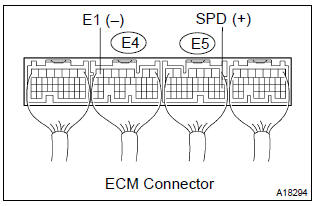
- Shift the lever to the neutral position.
- jack up the vehicle.
- turn the ignition switch on.
- check the voltage between the terminals of the e4 and e5 ecm connectors as the wheel is turned slowly.
Standard:

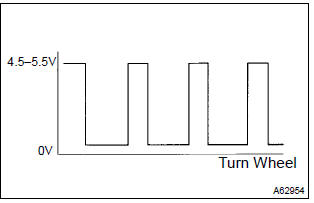
Hint
: the output voltage should fluctuate up and down similarly to the diagram on the left when the wheel is turned slowly.


Replace ecm


Other materials:
Circuit description
The vehicle speed sensor circuit is sent to cruise control ecu assy as a
vehicle speed signal. For each rotation
of the shaft, the vehicle speed sensor sends a signal through the combination
meter assembly to the
cruise control ecu assy (see the following chart). The cruise control ecu assy
...
Stabilizer bar front
Replacement
Hint: components:
1. Remove front wheel
2. Remove front stabilizer link assy lh
Remove the 2 nuts and stabilizer bar link.
Hint:
if the ball joint turns together with the nut, use a hexagon
wrench (6 mm) to hold the stud.
3. Remove front stabilizer link assy rh
Hint:
...
On–vehicle inspection
1. Inspect refrigerant pressure with manifold gauge set
this is a method in witch the trouble is located by using
a manifold gauge set. Read the manifold gauge pressure
when the these conditions are established.
Test conditions:
temperature at the air inlet with the switch set
...