
Toyota Corolla (E120) 2002–2008 Repair Manual / Diagnostics / Sfi system / Vehicle speed sensor ”a” / Circuit description
Toyota Corolla (E120): Circuit description
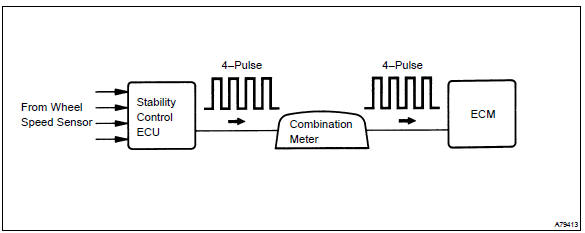
The vehicle equipped with abs detects a vehicle speed using the stability control ecu and wheel speed sensor. This sensor monitors a wheel rotation speed and sends the signal to the ecu.
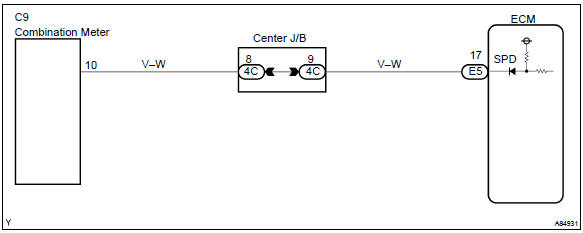
The stability control ecu converts these wheel speed signals into a 4–pulse signal and outputs it to the ecm via the combination meter.
The ecm determines the vehicle speed based on the frequency of these pulse signals.
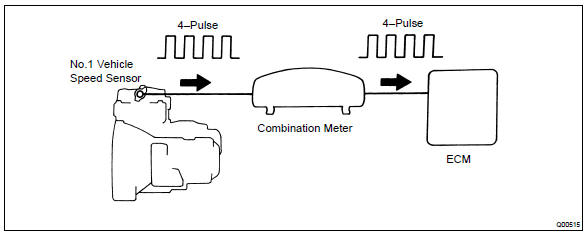
In the vehicle without abs, the no. 1 Vehicle speed sensor outputs a 4–pulse signal for every revolution of the rotor shaft, which is rotated by the transmission output shaft via the driven gear. After this signal is converted into a more precise rectangular waveform by the waveform shaping circuit inside the combination meter, it is then transmitted to the ecm. The ecm determines the vehicle speed based on the frequency of these pulse signal.
W/ abs:
W/o abs:
Monitor description
Equipped with abs:
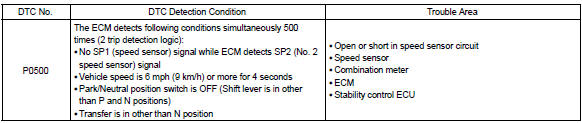
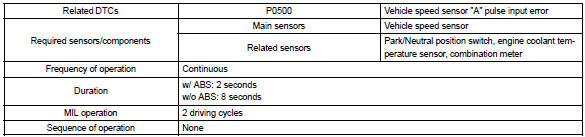
the ecm assumes that the vehicle is driven when the rpm of the transmission counter gear indicates more than 300 rpm and it has been over 30 seconds since the park/neutral position switch was turned off. If there is no signal from the vehicle speed sensor with these conditions satisfied, the ecm concludes that there is a fault in the vehicle speed sensor. The ecm will turn on the mil and a dtc is set.
Not equipped with abs:
the ecm assumes that the vehicle is driven when the park/neutral position switch is off and it has been over 4 seconds since the actual vehicle speed was 9 km/h or more.
If there is no signal from the vehicle speed sensor with these conditions satisfied, the ecm concludes that there is a fault in the vehicle speed sensor. The ecm will turn on the mil and a dtc is set.
Monitor strategy
Typical enabling conditions
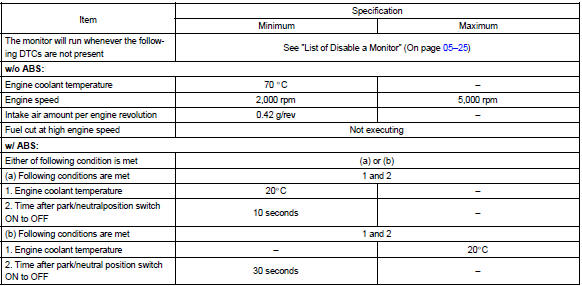

Typical malfunction thresholds

Wiring diagram


Other materials:
Luggage compartment door garnish outside
Replacement
Hint:
the installation procedures are the removal procedures in reverse order.
However, only installation procedures
requiring additional information are included.
1. Remove luggage compartment lock cylinder & key set
remove the 2 nuts and luggage compartment lock cyl ...
Drive shaft / propeller shaft
Preparation
Sst
Recomended tools
Equipment
Lubricant
...
Child restraint system
fixed with a child restraint
LATCH anchor (except for
Puerto Rico)
■ Child restraint LATCH
anchors
LATCH anchors are provided for
the outboard rear seat. (Marks
displaying the location of the
anchors are attached to the
seats.)
■ When installing in the rear
outboard seats
Install the child restraint system
in accordance to the operation
manual enclosed with th ...