
Toyota Corolla (E170) 2014–2019 Owners Manual / When trouble arises / Steps to take in an emergency / If the shift lever cannot be shifted from P (except vehicles with a manual transmission)
Toyota Corolla (E170): If the shift lever cannot be shifted from P (except vehicles with a manual transmission)
If the shift lever cannot be shifted with your foot on the brake pedal, there may be a problem with the shift lock system (a system to prevent accidental operation of the shift lever). Have the vehicle inspected by your Toyota dealer immediately.
The following steps may be used as an emergency measure to ensure that the shift lever can be shifted:
1 Set the parking brake.
2 Vehicles without a smart key system: Turn the engine switch to the “ACC” position.
Vehicles with a smart key system: Turn the engine switch to ACCESSORY mode.
3 Depress the brake pedal.
4 Pry the cover up with a flathead screwdriver or equivalent tool.
To prevent damage to the cover, cover the tip of the screwdriver with a rag.
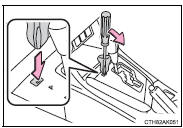
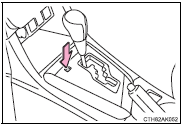
5 Press the shift lock override button.
The shift lever can be shifted while the button is pressed.


Other materials:
Replacement
1. Remove combination meter assembly
2. Disconnect brake master cylinder push rod clevis
remove the clip and push rod clevis pin and wave washer, and
disconnect the push rod clevis from
the brake pedal.
3. Remove brake pedal support sub–assy
Remove the bolt from the bra ...
Problem symptoms table
Hint:
use the table below to help determine the cause of the problem. The numbers
indicate the priority of the
likely cause of the problem. Check each part in order. If necessary, replace
these parts.
1. Headlamp and tail lamp
2. Front fog lamp system
3. Turn signal and hazard warni ...