
Toyota Corolla (E120) 2002–2008 Repair Manual / Diagnostics / Power door lock control system / How to proceed with troubleshooting
Toyota Corolla (E120): How to proceed with troubleshooting
1 Vehicle brought in

2 Customer problem analysis check and symptom check

3 Problem symptoms table
- Without applicable symptoms, proceed to ”a”
- with applicable symptoms, proceed to ”b”


4 Perform troubleshooting in the following method, depending on malfunction symptom
- Terminals of ecu
- inspection
- on–vehicle inspection
5 Adjustment, repair or replacement

End
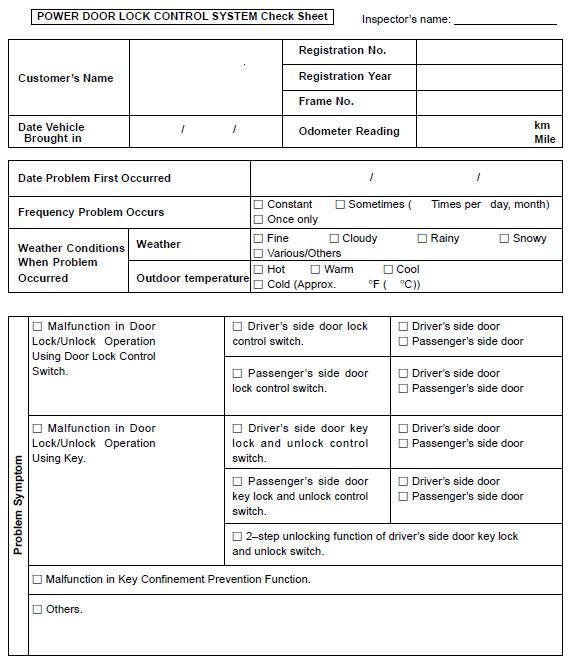
Customer problem analysis check
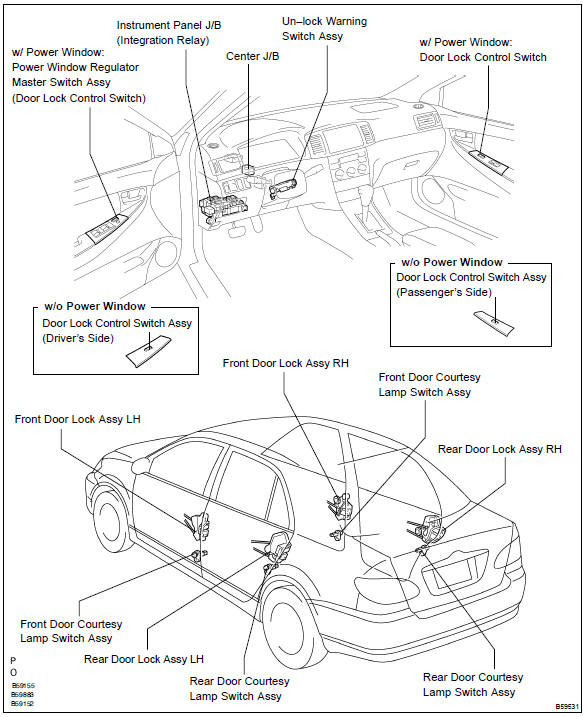
Location


Other materials:
Replacing light bulbs
■ Headlight high beams
1 Turn the bulb base counterclockwise.
2 Pull the bulb out while pressing the lock release of the connector.
3 Replace the light bulb, and install the bulb base.
Align the 3 tabs on the light bulb with the mounting and insert.
4 Turn and secure the bulb base.
...
On–vehicle inspection
1. Inspect cooling system for leaks
Caution:
to avoid the danger of being burned, do not remove the radiator
cap while the engine and radiator are still hot, as fluid
and steam can be blown out under pressure.
fill the radiator with coolant and attach a radiator cap tester.
...
Circuit description
When a misfire occurs in the engine, hydrocarbons (hc) enter the exhaust in
high concentrations. If this hc
concentration is high enough, there could be an increase in exhaust emissions
levels. High concentrations
of hc passing through the catalyst also cause to temperature of the catalyst to ...