
Toyota Corolla (E120) 2002–2008 Repair Manual / Introduction / Terms / Glossary of sae and toyota terms
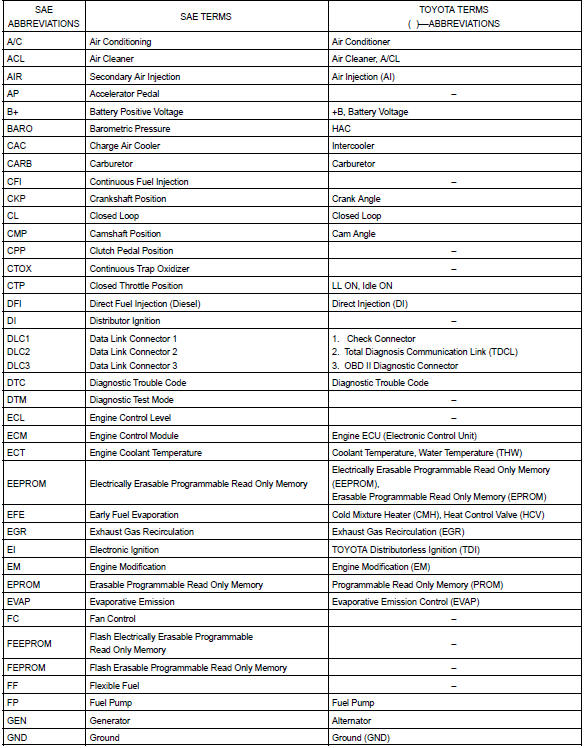
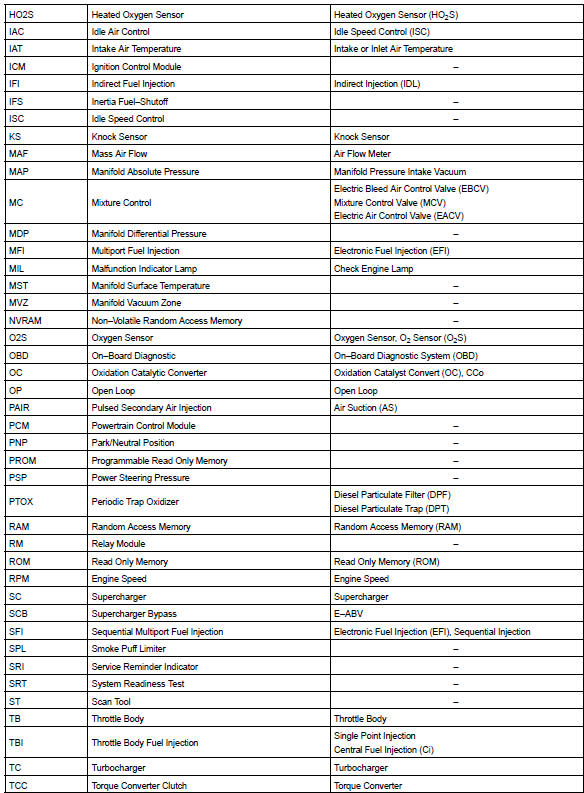
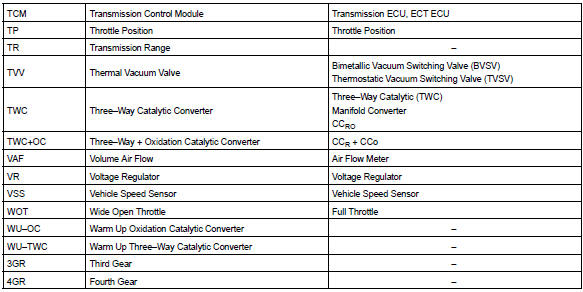
Toyota Corolla (E120): Glossary of sae and toyota terms
This glossary lists all sae–j1930 terms and abbreviations used in this manual in compliance with sae recommendations, as well as their toyota equivalents.


Other materials:
Checking and adding the
brake fluid
■ Checking fluid level
The brake fluid level should be
between the "MAX" and "MIN"
lines on the tank.
■ Adding fluid
1. Slide and lift up the rubber
strip to partly remove it as
shown.
2. Disconnect the claws and
remove the service cover.
3. Remove the reservoir cap.
4. Add brake fluid slowl ...
RSA (Road Sign Assist)
The RSA system detects
specific road signs using
the front camera and/or navigation
system (when speed
limit information is available)
and warns the driver
via displays and buzzers.
WARNING
■For safe use
Driving safely is solely the
responsibility of the driver. Pay
careful attention to the su ...
Replacement
Hint: components:
1. Precaution
2. Disconnect battery negative terminal
3. Remove instrument panel sub–assy lower
Remove the screw from the glove compartment door
stopper sub–assy.
pull the instrument panel sub–assy lower to remove it.
4. Separate passenger airbag co ...