
Toyota Corolla (E170): Control panel
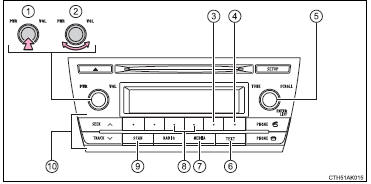
1 Power
2 Volume
3 Repeat play
4 Random playback
5 Select a file or display folder list
6 Displays text message
7 Playback
8 Select a folder, fast-forward or reverse
9 Search playback
10 Select a file


Other materials:
Inspection procedure
1 Check harness and connector(transmission control switch –
body ground)
Disconnect the transmission control switch connector of
shift lever assy.
measure the resistance according to the value(s) in the
table below.
Standard:
2 Inspect transmission control switch
M ...
Circuit inspection
1 Check d squib circuit(airbag sensor assy center – horn button
assy)
Disconnect the negative (–) terminal cable from the battery,
and wait at least for 90 seconds.
disconnect the connectors between the airbag sensor
assy center and the horn button assy.
connect the ...
Air conditioning controls
■ Adjusting the temperature setting
To adjust the temperature setting, turn
clockwise to increase the temperature
and turn counterclockwise to decrease
the temperature.
■ Fan speed setting
Press “>” on to increase the fan
speed.
Press “<” on to decrease the ...