
Toyota Corolla (E170) 2014–2019 Owners Manual / Interior features / Basic Operations (Multimedia system) / Basic Audio Operations
Toyota Corolla (E170): Basic Audio Operations
Basic audio operations and functions common to each mode are explained in this section.
Operating the multimedia system
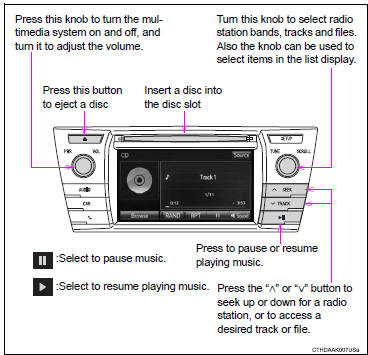
Random playback
Select  to change on/off.
Repeat play
Select  to change on/off.
■Using cellular phones
Interference may be heard through the multimedia system's speakers if a cellular phone is being used inside or close to the vehicle while the multimedia system is operating.
CAUTION
■Laser produc
t This product is a class 1 laser product.
Do not open the cover of the player or attempt to repair the unit yourself.
Refer servicing to qualified personnel.
●Laser products • Do not take this unit apart or attempt to make any changes yourself. This is an intricate unit that uses a laser pickup to retrieve information from the surface of compact discs. The laser is carefully shielded so that its rays remain inside the cabinet. Therefore, never try to disassemble the player or alter any of its parts since you may be exposed to laser rays and dangerous voltages.
• This product utilizes a laser.
Use of controls or adjustments or performance of procedures other than those specified herein may result in hazardous radiation exposure.
THE USE OF OPTICAL INSTRUMENTS WITH THIS PRODUCT WILL INCREASE EYE HAZARD.
NOTICE
■To prevent battery discharge
Do not leave the multimedia system on longer than necessary when the engine is off.
■To avoid damaging the multimedia system
Take care not to spill drinks or other fluids on the multimedia system.


Other materials:
Sun visors
To set the visor in the forward
position, flip it down.
To set the visor in the side
position, flip down, unhook,
and swing it to the side.
To use the side extender,
place the visor in the side
position, then slide it backward.
(if equipped)
Vanity mirrors
Slide the cover to open.
The v ...
Basic inspection
When the malfunction is not confirmed in the dtc check, troubleshooting
should be carried out in all the
possible circuits considered as causes of the problem. In many cases, by
carrying out the basic engine check
shown in the following flowchart, the location causing the problem can be found ...
Using the key (vehicles
without a smart key system
and with a wireless
remote control function)
Releasing
To release the key, press the button
Folding
To stow the key, press the button
then fold the key.
Using the mechanical key
(vehicles with a smart key
system)
To take out the mechanical key,
slide the release button and take
the key out.
The mechanical key can only be
inserted in o ...