
Toyota Corolla (E120): Clock assy
Replacement
1. Remove console panel upper
2. Remove heater control knob
3. Remove instrument cluster finish panel
4. Remove clock assy
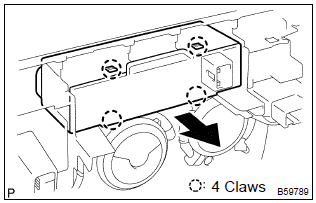
- Using a screwdriver, disengage the 4 claws, remove the clock as shown in the illustration.
Hint
: tape the screwdriver tip before use.


Other materials:
Mechanical system tests
1. Perform mechanical system tests
Measure the stall speed.
The object of this test is to check the overall performance of the transaxle
and engine by measuring
the stall speeds in the d and r positions.
Notice:
Do the test at normal operating atf temperature 50 to 80 °c (122 to
...
Front suspension arm sub–assy lower no.1 Lh
Replacement
Hint: components:
1. Remove front wheel
2. Disconnect front stabilizer link assy lh (lh (a/t) position)
3. Disconnect front stabilizer link assy rh (lh (a/t) position)
Hint:
remove the rh side by the same procedures as the lh side.
4. Separate front suspension arm sub–assy lowe ...
Emission inspection and maintenance (I/M) programs
Some states have vehicle
emission inspection programs
which include OBD
(On Board Diagnostics)
checks. The OBD system
monitors the operation of
the emission control system.
If the malfunction indicator
lamp comes on
The OBD system determines
that a problem exists somewhere
in the emission control
sy ...