
Toyota Corolla (E120): Circuit description
The shift solenoid valve sl is turned ”on” and ”off” by signals from the ecm in order to control the hydraulic pressure operation, the lock–up relay valve, which then the controls operation of the lock–up clutch.
Fail safe function: if the ecm detects a malfunction, it turns the shift solenoid valve sl off.

Monitor description
Based on the signals from the throttle position sensor, the airflow meter and the crankshaft position sensor, the ecm sends a signal to the sl solenoid valve to regulate the hydraulic pressure and provide smoother gearshifts. The shift–solenoid valve sl responds to commands from the ecm. The valve controls the lock–up relay valve to perform the torque–converter lock–up function. If the ecm detects an open or short circuit for shift–solenoid sl, it will illuminate the mil.
Monitor strategy
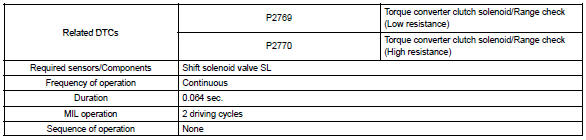
Typical enabling condition
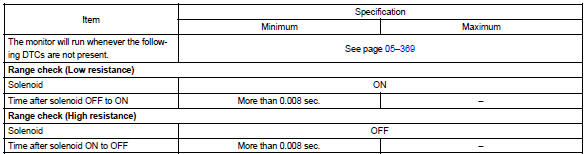
Typical malfunction thresholds
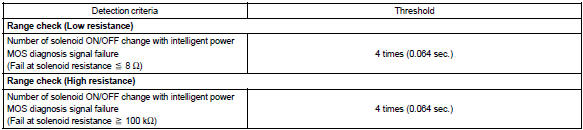
Component operating range

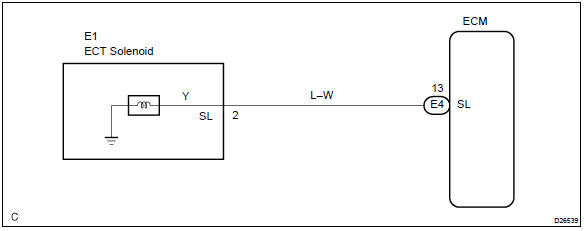
Wiring diagram


Other materials:
Engine coolant
The coolant level is satisfactory if it is between the “F” and “L” lines on the
reservoir when the engine is cold.
1 Reservoir cap
2 “F” line
3 “L” line
If the level is on or below the “L” line, add coolant up to the “F” line.
■Coolant selection
Only use “To ...
Trailer towing
Toyota does not recommend
towing a trailer with
your vehicle. Toyota also
does not recommend the
installation of a tow hitch or
the use of a tow hitch carrier
for a wheelchair, scooter,
bicycle, etc. Your vehicle is
not designed for trailer towing
or for the use of tow
hitch mounted carriers.
Dingh ...
How to proceed with troubleshooting
The hand–held tester can be used at step 3, 4, 5, 7, 10.
1 Vehicle brought to workshop
2 Customer problem analysis
3 Connect hand–held tester to dlc3
Hint:
if the display indicates a communication fault in the tool, inspect dlc3.
4 Check dtc and freeze frame data
Hint:
record or pr ...