
Toyota Corolla (E170) 2014–2019 Owners Manual / Interior features / Using the Multimedia system / Selecting the audio source / Changing audio source
Toyota Corolla (E170): Changing audio source
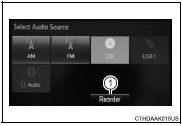
1 Press the “AUDIO” button to display the audio source selection screen.
If the audio source selection screen is not displayed, press the “AUDIO” button again.
2 Select the desired audio source.
1 Select the desired audio source then
 or
or
 to reorder.


Other materials:
If the vehicle battery is discharged
The following procedures may be used to start the engine if the vehicle’s
battery is discharged.
You can also call your Toyota dealer or a qualified repair shop.
If you have a set of jumper (or booster) cables and a second vehicle with a 12-volt
battery, you can jump start your vehicle by fo ...
Inspection
1. Intake air flow meter sub–assy
Inspect the intake air flow meter resistance.
Using an ohmmeter, measure the resistance between
terminals tha and e2.
Resistance:
at –20 c (–4 f) 13.6 To 18.4 KΩ
at 20 c (68 f) 2.21 To 2.69 KΩ
at 60 c (140 f) 0.49 To 0.67 ...
Making a phone call
To enter the “PHONE” mode, press the off-hook switch.
■ Making a phone call
● Dialing by selecting a name
● Speed dialing
● Dialing by entering the number
● Dialing from call histories
■ Receiving a phone call
● Answering the phone
● Refusi ...