
Toyota Corolla (E120): Basic inspection
When the malfunction is not confirmed in the dtc check, troubleshooting should be carried out in all the possible circuits considered as causes of the problem. In many cases, by carrying out the basic engine check shown in the following flowchart, the location causing the problem can be found quickly and efficiently. Therefore, using this check is essential in the engine troubleshooting.
1 Check battery voltage
Notice
: carry out this check with the engine stopped and ignition switch off.

Ng charge or replace battery

2 Check if engine will crank
Ng proceed to problem symptoms table on page
3 Check if engine starts
Ng go to step 7
4 Check air filter
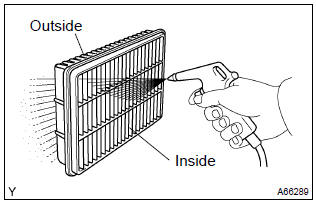
- Visually check that the air filter is not excessively dirty or oily.
Notice
: if necessary, clean the filter with compressed air. First blow from the inside thoroughly, then blow from the outside of the filter.
Ng clean or replace
5 Check idle speed
Ng proceed to problem symptoms table on page
6 Check ignition timing
Ng proceed to page 14–1 and continue to troubleshoot
Proceed to problem symptoms table on page
7 Check fuel pressure
Ng proceed to page 11–1 and continue to troubleshoot
8 Check for spark
Ng proceed to page 18–1 and continue to troubleshoot
Proceed to problem symptoms table on page


Other materials:
Unlocking and locking the doors from the inside
◆ Door lock switches
1 Locks all the doors
2 Unlocks all the doors
◆ Inside lock buttons
1 Locks the door
2 Unlocks the door
The front doors can be opened by pulling the inside handle even if the lock buttons
are in the lock position.
...
Using the audio system
Optimal use of the audio system
Sound quality (treble/bass) and volume balance can be adjusted.
1 Displays the current mode
2 Changes the following setting
• Sound quality and volume balance
The sound quality and balance setting can be changed to produce the best sound.
• Automatic ...
Brake
Service data
Torque specification
Parking brake
Service data
Torque specification
...