
Toyota Corolla (E170) 2014–2019 Owners Manual / Operation of each component / Adjusting the seats / Outside rear view mirrors / Adjustment procedure
Toyota Corolla (E170): Adjustment procedure
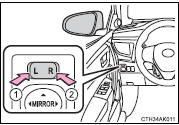
1 To select a mirror to adjust, press the switch.
1 Left
2 Right
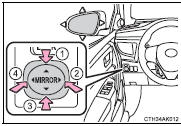
2 To adjust the mirror, press the switch.
1 Up
2 Right
3 Down
4 Left


Other materials:
Replacement
Hint: components:
1. Remove radiator grille sub–assy
2. Remove front bumper cover
3. Remove lh headlamp assy
Remove the 3 bolts.
pull out the headlight assy lh forward, then disconnect
the bracket of body side.
Release the claws and disconnect the connectors as
sh ...
Inspection procedure
1 Inspect transmission wire(s1)
Disconnect the transmission wire connector from the
transaxle.
measure the resistance according to the value(s) in the
table below.
Standard:
2 Check harness and connector(transmission wire – ecm)
Connect the transmission connec ...
Overhaul
Hint: component:
1. Discharge refrigerant from refrigeration system
sst 07110–58060 (07117–58080, 07117–58090, 07117–78050, 07117–88060,
07117–88070,
07117–88080)
2. Disconnect cooler refrigerant suction hose no.1
Install sst to piping clamp.
Sst 09870–00015
Hint ...