
Toyota Corolla (E170) 2014–2019 Owners Manual / Operation of each component / Adjusting the seats / Outside rear view mirrors / Folding the mirrors
Toyota Corolla (E170): Folding the mirrors
Push the mirror back in the direction of the vehicle’s rear.
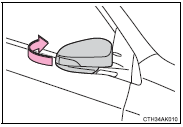
■Mirror angle can be adjusted when
► Vehicles without a smart key system The engine switch is in the “ACC” or “ON” position.
►Vehicles with a smart key system The engine switch is in ACCESSORY or IGNITION ON mode.
■When the mirrors are fogged up (if equipped)
The outside rear view mirrors can be cleared using the mirror defoggers. Turn on the rear window defogger to turn on the outside rear view mirror defoggers.
CAUTION
■Important points while driving
Observe the following precautions while driving.
Failure to do so may result in loss of control of the vehicle and cause an accident, resulting in death or serious injury.
●Do not adjust the mirrors while driving.
●Do not drive with the mirrors folded.
●Both the driver and passenger side mirrors must be extended and properly adjusted before driving.
■When a mirror is moving
To avoid personal injury and mirror malfunction, be careful not to get your hand caught by the moving mirror.
■When the mirror defoggers are operating (if equipped
) Do not touch the rear view mirror surfaces, as they can become very hot and burn you.


Other materials:
Overhaul
Notice: when installing, coat the parts indicated by the arrow with
power steering fluid or molybdenum disulfide lithium base grease.
1. Precaution
2. Disconnect battery negative terminal
3. Inspect center front wheel
4. Remove horn button assy
5. Remove steering wheel assy
sst 09950–50013 ...
Circuit description
In the diagram below, when the engine is cranked, current flows from terminal
st2 of the ignition switch to
the starter relay coil and also current flows to terminal sta of the ecm (sta
signal).
When the sta signal and ne signal are input to the ecm, tr is turned on, current
flows to the c ...
Spiral cable sub–assy
Components
Replacement
Hint: components:
1. Precaution
2. Disconnect battery negative terminal
3. Place front wheels facing straight ahead
check that the front wheels are facing straight ahead.
4. Remove horn button assy
5. Remove steering wheel assy
sst 09950–50013 ...