
Toyota Corolla (E170) 2014–2019 Owners Manual / Interior features / Bluetooth® phone (Multimedia system) / What to do if... (Troubleshooting)
Toyota Corolla (E170): What to do if... (Troubleshooting)
If there is a problem with the hands-free system or a Bluetooth® device, first check the table below.
► When using the hands-free system with a Bluetooth® device
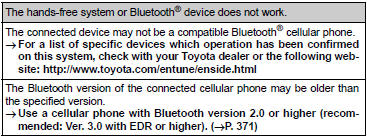
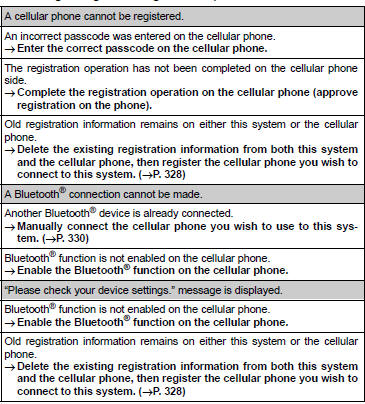
► When registering/connecting a cellular phone
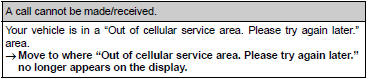
► When making/receiving a call
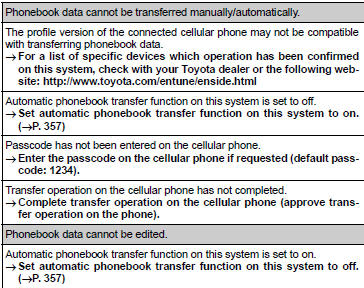
► When using the phonebook
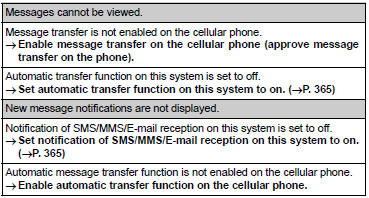
► When using the Bluetooth® message function
► In other situations


Other materials:
Inspection procedure
1 Input signal check
See the input signal check on page 05–745.
check the indicator light when the clutch pedal is depressed.
Ok:
the indicator light goes off when the clutch pedal is
depressed.
2 Inspect terminal voltage(d)
Turn the ignition switch to on.
&n ...
Selecting a folder
■ Selecting a folder
Press (
) or (
) to select the desired folder.
■ Selecting a folder and file from a folder list
1 Press .
A folder list will be displayed.
2 Turn and press to select a folder
and a file.
To return to the previous display, press
(BACK).
■ Return ...
Rear seats
► Type A
1 Up
Pull the head restraints up.
2 Down
Push the head restraint down while pressing the lock release button.
► Type B
1 Up
Pull the head restraints up.
2 Down
Push the head restraint down while pressing the lock release button.
■Removing the head restraints ...