
Toyota Corolla (E170) 2014–2019 Owners Manual / Interior features / Using Bluetooth® devices / Using the steering wheel switches
Toyota Corolla (E170): Using the steering wheel switches
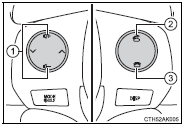
The steering wheel switches can be used to operate a connected cellular phone or portable digital audio player (portable player).
Operating a Bluetooth® phone using the steering wheel switches
1 Volume
The voice guidance volume cannot be adjusted using these buttons.
2 Off-hook switch
Turns the hands-free system on/starts a call 3 On-hook switch
Turns the hands-free system off/ends a call/refuses a call


Other materials:
Bluetooth® Audio
Operating a Bluetooth® enabled portable player
1 Power
2 Volume
3 Select an album, fast-forward or reverse
4 Repeat play
5 Random playback
6 Selecting an item
7 Displays text message
8 Playback
9 Playback/pause
10 Search playback
11 Select a track
Selecting an album
Press (
) or ...
Inspection procedure
1 Inspect fuse(ecu–ig fuse)
Remove ecu–ig fuse from the instrument panel j/b.
check continuity of ecu–ig fuse.
Ok:
continuity
2 Inspect battery
Ok:
voltage: 10 – 14 v
3 Inspect skid control ecu connector(ig1 terminal voltage)
In case of using hand–held te ...
Noise occurs
Inspection procedure
1 Check of speaker installation
Check speaker installation condition.
Check that each speaker is securely installed.
Standard: malfunction disappear.
Hint:
the radio is equipped with noise prevention system that does not work against
the regular use of t ...