
Toyota Corolla (E170) 2014–2019 Owners Manual / Interior features / Using the radio
Toyota Corolla (E170): Using the radio
Radio operation
Select “AM” or “FM” to begin listening to the radio.
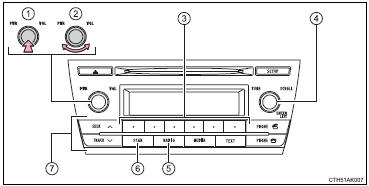
1 Power
2 Volume
3 Station selectors
4 Adjust frequency or select an item
5 AM/FM mode button
6 Scan for receivable stations
7 Seek a frequency
Setting station presets
1Search for a desired station by turning
 or pressing
 or
or
 .
.
2 Press and hold a desired station selector button until you hear a beep.
Scanning radio stations
■ Scanning preset radio stations 1
Press and hold  until you hear
a beep.
until you hear
a beep.
2 Preset stations will be played for 5 seconds each.
When the desired station is reached, press
 again.
■ Scanning all radio stations within range
1 Press  .
.
All stations with reception will be played for 5 seconds each.
2 When the desired station is reached, press
 again.
■When the battery is disconnected
Station presets are erased.
■Reception sensitivity
●Maintaining perfect radio reception at all times is difficult due to the continually changing position of the antenna, differences in signal strength and surrounding objects, such as trains, transmitters, etc.
●The radio antenna is mounted inside the rear window. To maintain clear radio reception, do not attach metallic window tinting or other metallic objects to the antenna wire mounted inside the rear window.
●When  is used, automatic station selection
may not be possible.
is used, automatic station selection
may not be possible.


Other materials:
Starting the engine
1 Check that the parking brake is set.
► Vehicles without a multi-information display
2 Continuously variable transmission: Check that the shift lever is set in P.
Firmly depress the brake pedal.
Manual transmission: Check that the shift lever is set in N. Firmly depress the
clutch peda ...
Inspection procedure
Hint:
if dtc p0441 (purge flow), p0446 (vsv for ccv or vsv for pressure
switching valve), p0451, p0452
or p0453 is output with dtc p0442 or p0456 , first troubleshoot
dtc p0441, p0446, p0451, p0452 or p0453. If no malfunction is detected,
troubleshoot dtc
p0442 or p0456 next.
...
Correct driving posture
1 Adjust the angle of the seatback so that you are sitting straight up and so
that you do not have to lean forward to steer.
2 Adjust the seat so that you can depress the pedals fully and so that your arms
bend slightly at the elbow when gripping the steering wheel.
3 Lock the head restraint ...