
Toyota Corolla (E120) 2002–2008 Repair Manual / Diagnostics / Combination meter / Seat belt warning lamp for front passenger’s seat
does not flash
Toyota Corolla (E120): Seat belt warning lamp for front passenger’s seat does not flash
Wiring diagram
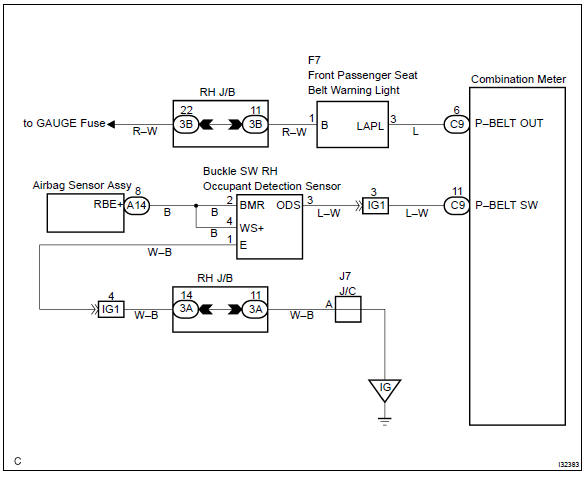
Inspection procedure
1 Inspect combination meter assy
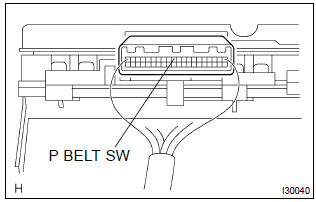
- Ground terminal c9–11 on the combination meter side.
- check that the warning lightlights up.
Ok: warning light lights up.


2 Inspect passenger seat belt warning lamp assy
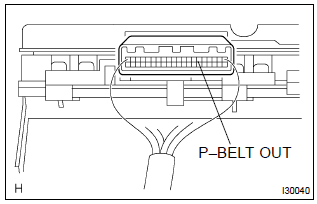
- Ground terminal c9–6 on the combination meter side.
- check that the warning lightlights up.
Ok: warning light lights up.


Check and replace combination meter assy
3 Inspect front seat inner belt assy rh
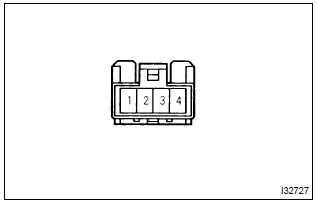
- Check continuity.
- Disconnect the front seat inner belt assy.
- Check the continuity in between terminals 1 and 2
of front seat inner belt assy rh.
Ok:



4 Inspect separate seat type front seat cushion pad
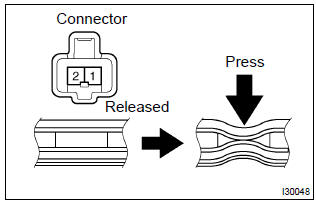
- Disconnect the separate type front seat cushion pad.
- check continuity separate type front seat cushion pad.



Repair or replace harness and connector


Other materials:
Front axle lh hub bolt
Replacement
Hint: components:
1. Remove front wheel
2. Separate front disc brake caliper assy lh
3. Remove front disc
4. Remove front axle lh hub bolt
Using sst and a hammer handle or an equivalent, remove
the lh hub bolt.
Sst 09628–10011
5. Install front axle lh hub bolt
...
Tire pressure warning system (if equipped)
Your vehicle is equipped with a tire pressure warning system that uses tire pressure
warning valves and transmitters to detect low tire inflation pressure before serious
problems arise.
◆ Installing tire pressure warning valves and transmitters
When replacing tires or wheels, tire press ...
Toyota vehicle intrusion protection system
On–vehicle inspection
1. Outline of toyota vehicle intrusion protection (tvip) system
Hint:
the theft deterrent system has 2 modes; one is the active mode that is an
initially set mode and another is
the passive mode that can be switched on/off by the specified method (see step
4).
&nb ...