
Toyota Corolla (E170): Repeat play
Pressing  (RPT) changes the repeat
playback mode in the following order:
(RPT) changes the repeat
playback mode in the following order:
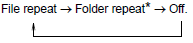
*: Available except when RDM (random playback) is selected


Other materials:
Evap monitor (vacuum pressure monitor)
Notice:
a cold soak must be performed prior to conducting the drive pattern to complete
the internal pressure
readiness monitor.
Cold soak preconditions
The monitor will not run unless:
mil is off.
Fuel level is approximately 1/2 to 3/4.
Altitude is 7800 feet (2400 m) or less.
...
Canceling and resuming the constant speed control
1 Pulling the lever toward you cancels the constant speed control.
The speed setting is also canceled when the brakes are applied or the clutch
pedal (manual transmission) is depressed.
2 Pushing the lever up resumes the constant speed control.
Resuming is available when the vehicle speed is mo ...
Inspection procedure
1 Check side squib(rh) circuit(airbag sensor assy center – front
seat airbag assy rh)
Disconnect the negative (–) terminal cable from the battery,
and wait at least for 90 seconds.
disconnect the connectors between the airbag sensor
assy center and the front seat airbag assy ...