
Toyota Corolla (E120) 2002–2008 Repair Manual / Diagnostics / Supplemental restraint system / Short in side squib (rh) circuit / Inspection procedure
Toyota Corolla (E120): Inspection procedure
1 Check side squib(rh) circuit(airbag sensor assy center – front seat airbag assy rh)
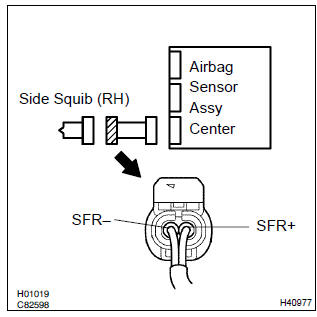
- Disconnect the negative (–) terminal cable from the battery, and wait at least for 90 seconds.
- disconnect the connectors between the front seat airbag assy (rh) and the airbag sensor assy center.
- release the airbag activation prevention mechanism of the connector (on the airbag sensor assy center side) between the airbag sensor assy center and the front seat airbag assy (rh) .
- for the connector (on the front seat airbag assy side) between
the airbag sensor assy center and the front seat
airbag assy (rh), measure the resistance between sfr+
and sfr–.
Ok: resistance: 1 mw or higher


2 Check air bag sensor assy center
Sst 09843–18040
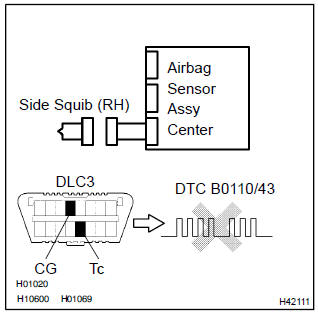
- Connect the the connector to the airbag sensor assy center.
- connect the negative (–) terminal cable to the battery, and wait at least for 2 seconds.
- turn the ignition switch to on, and wait at least for 20 seconds.
- clear the dtc stored in memory .
- turn the ignition switch to lock, and wait at least for 20 seconds.
- turn the ignition switch to on, and wait at least for 20 seconds.
- check the dtc .
Ok: dtc b0110/43 is not output.
Hint
: codes other than code b0110/43 may be output at this time, but they are not relevant to this check.


3 Check side squib(rh)
Sst 09843–18040
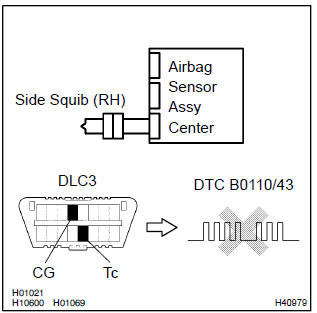
- Turn the ignition switch to lock.
- disconnect the negative (–) terminal cable from the battery, and wait at least for 90 seconds.
- connect the front seat airbag assy (rh) connector.
- connect the negative (–) terminal cable to the battery, and wait at least for 2 seconds.
- turn the ignition switch to on, and wait at least for 20 seconds.
- clear the dtc stored in memory .
- turn the ignition switch to lock, and wait at least for 20 seconds.
- turn the ignition switch to on, and wait at least for 20 seconds.
- check the dtc .
Ok: dtc b0110/43 is not output.
Hint
: codes other than code b0110/43 may be output at this time, but they are not relevant to this check.


Use simulation method to check


Other materials:
Replacement
1. Remove console box sub–assy rear
2. Remove parking brake lever sub–assy
Disconnect the parking brake switch connector from the
parking brake switch.
remove the lock nut and adjusting nut from the parking
brake cable assy no.1.
Remove the 2 bolts.
Usin ...
Circuit inspection
1 Check d squib circuit(airbag sensor assy center – horn button
assy)
Disconnect the negative (–) terminal cable from the battery,
and wait at least for 90 seconds.
disconnect the connectors between the airbag sensor
assy center and the horn button assy.
connect the ...
Body dimension drawings
Engine compartment
Body opening areas (side view: front)
Body opening areas (side view: rear)
Sedan
Body opening areas (rear view)
Sedan
Under body
Under body
Front suspension crossmember
Front suspension crossmember
...