
Toyota Corolla (E120) 2002–2008 Repair Manual / Steering column / Steering system / Problem symptoms table
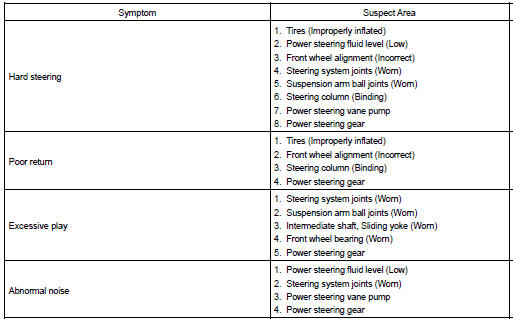
Toyota Corolla (E120): Problem symptoms table
Use the table below to help you find the cause of the problem. The numbers indicate the priority of the likely cause of the problem. Check each part in the order shown. If necessary, repair or replace these parts.


Other materials:
Sliding roof/convertible
Service data
Torque specification
Engine hood/door
Torque specification
Exterior/interior trim
Torque specification
Cruise control
Service data
Torque specification
...
Speed sensor front lh
Replacement
Hint:
replace the rh side by the same procedure as the lh side.
1. Remove front wheel
2. Remove front fender liner lh
3. Remove speed sensor front lh
Disconnect the speed sensor wire harness clamp from
the body.
disconnect the speed sensor connector.
Remo ...
Circuit description
When the brake pedal is depressed, the stop lamp switch assy sends a signal
to the cruise control ecu assy.
When the cruise control ecu assy receives this signal, it cancels the cruise
control.
A fail–safe function is provided so that cancel functions normally, even if
there is a malfu ...